Agent Integration
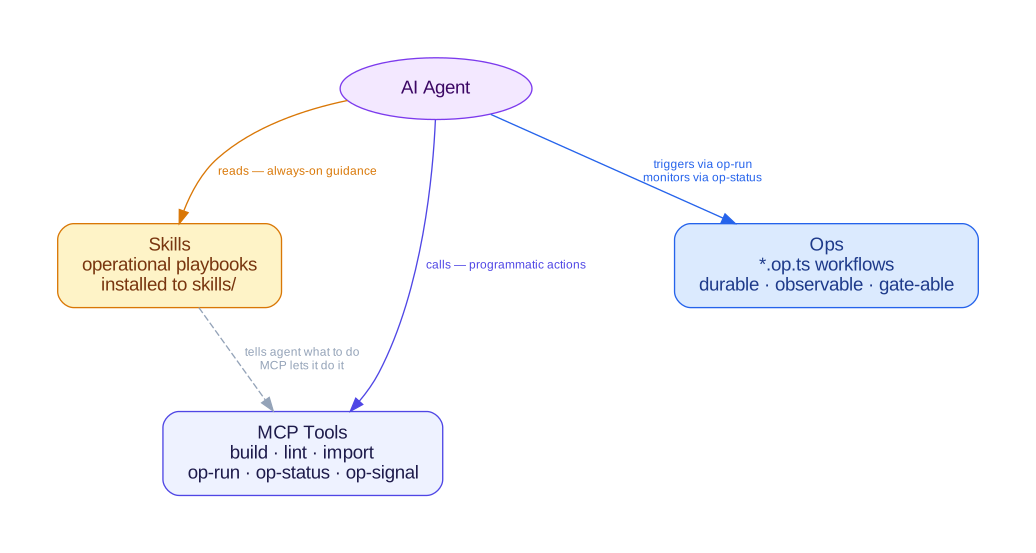
chant integrates with AI coding agents through three surfaces: skills (operational knowledge), MCP tools (programmatic actions), and Ops (durable deployment workflows). You write TypeScript; the agent uses these surfaces to understand and execute the build → validate → deploy → troubleshoot workflow.
Skills
Section titled “Skills”Skills are operational playbooks — structured markdown documents contributed by lexicons. They teach agents how to work with a specific infrastructure platform: which commands to run, what to validate, how to deploy, and how to troubleshoot failures.
Skills are installed by chant init and refreshed by chant update. They live in the project root at skills/:
my-project/ skills/ chant-aws/ SKILL.md chant-aws-eks/ SKILL.md src/ index.tsAgents that support file-based skill discovery load these automatically.
You don’t need to read or manage skill files yourself — they’re installed once and the agent reads them as needed.
MCP Tools
Section titled “MCP Tools”The MCP (Model Context Protocol) server gives agents programmatic access to chant operations. When an agent connects via MCP, it can build projects, run lint checks, scaffold files, and more — without the user typing commands.
chant init configures MCP automatically by writing to your IDE’s global MCP config file.
To configure manually, add the chant MCP server to your IDE’s MCP config:
{ "mcpServers": { "chant": { "command": "npx", "args": ["chant", "serve", "mcp"] } }}Available Tools
Section titled “Available Tools”| MCP tool | Description |
|---|---|
build | Synthesize and write infrastructure output |
lint | Run lint checks on TypeScript intent definitions |
import | Import infrastructure templates and generate TypeScript files |
explain | Summarize project resources by lexicon and kind |
scaffold | Generate starter files from lexicon templates |
search | Search available resource types across lexicons |
Resources
Section titled “Resources”| MCP resource | Description |
|---|---|
chant://context | Lexicon-specific instructions and patterns for chant development |
chant://examples/list | List of available chant examples |
Lexicon plugins can contribute additional tools and resources.
Read-only context tools
Section titled “Read-only context tools”Some lexicons add read-only context tools that build from your source and return what chant already computes — without touching any live system. They give an agent a before-it-runs view of your infrastructure: what a change does, what it pulls in, and whether it is safe, before it runs or merges. This is the window live tooling can’t see.
The GitLab lexicon ships these:
| MCP tool | Answers |
|---|---|
gitlab:checks | Is there anything risky in this pipeline? (returns the security findings) |
gitlab:pipeline | What does this pipeline do? (stages, jobs, run order) |
gitlab:references | What does it pull in from outside, and is it pinned? |
gitlab:affected | If I change this job, what re-runs? |
gitlab:pipeline-yaml | The generated .gitlab-ci.yml |
gitlab:source | Where did this job come from in my TypeScript? (file + composite) |
gitlab:owns | Is this job declared by chant in this project? |
gitlab:compare | If I migrate this GitHub workflow to GitLab, which safety properties survive? |
The GitHub lexicon ships the parallel set for Actions workflows:
| MCP tool | Answers |
|---|---|
github:checks | Is there anything risky in this workflow? (returns the security findings) |
github:workflow | What does this workflow do? (triggers, jobs, run order) |
github:references | What actions/images does it pull in, and are they pinned to a commit SHA? |
github:affected | If I change this job, what re-runs? |
github:workflow-yaml | The generated workflow YAML |
The Forgejo lexicon (Codeberg / self-hosted Forgejo / Gitea) ships the same set, plus the migration safety view:
| MCP tool | Answers |
|---|---|
forgejo:checks | Is there anything that won’t work on Forgejo? (WFJ findings: unresolved action refs, GitHub-hosted runner labels) |
forgejo:workflow | What does this workflow do? (triggers, jobs, run order) |
forgejo:references | What actions/images does it pull in, and are they pinned to a commit SHA? |
forgejo:affected | If I change this job, what re-runs? |
forgejo:workflow-yaml | The generated Forgejo workflow YAML |
forgejo:source | Where did this job come from in my TypeScript? (file + composite) |
forgejo:owns | Is this job declared by chant in this project? |
forgejo:compare | If I migrate this GitHub workflow to Forgejo, which safety properties survive? |
Every one of these reads the build only — no live instance, no run history, no writes. That boundary is deliberate: chant is a context producer, complementary to (not a copy of) the live tooling an agent already uses.
Ops are named, phased Temporal workflows defined in *.op.ts files. They run durable deployments — phases, gate steps that pause for human signals, compensation on failure — and surface progress in the Temporal UI.
# Start an Op workflowchant run alb-deploy
# Send a signal to unblock a gate stepchant run signal alb-deploy gate-dns-delegation
The MCP server exposes Op tools (op-list, op-run, op-status, op-signal) so agents can start and monitor deployments programmatically.
See the Ops guide for details.
When to Use What
Section titled “When to Use What”| Surface | When | Example |
|---|---|---|
| Skills | Always-on guidance — installed once, agent reads as needed | Agent checks the AWS skill before deploying a CloudFormation stack |
| MCP tools | Programmatic actions during execution | Agent calls build to synthesize templates, lint to validate, op-run to start a deployment |
| Ops | Durable multi-step workflows with observability and gate steps | Deploying infra + app layers, waiting for DNS delegation, rollback on failure |
Skills and MCP tools are complementary: skills tell the agent what to do, MCP tools let it do it. Ops tie both together into repeatable, observable workflows.