Nested Stacks
Show the whole prompt
Read https://intentius.io/chant/lexicons/aws/nested-stacks/.
Check first whether a separate stack (Multi-Stack Projects) or a composite fits better, as the page advises, and tell me which and why.
If a nested stack fits, move the resources into a child project directory with `stackOutput()` declarations, reference it from the parent with `nestedStack()`, and run `npx chant build src -o template.json` and `npx chant lint src` until WAW013, WAW014 and WAW015 are clean.
Open a pull request with the source and both templates; do not upload templates to S3 or run `aws cloudformation deploy`.
Never deploy to a real cloud account or shared environment (with `chant run`, `chant components` or a platform's own CLI), approve (a pull request review, `chant approve` or `chant run approve`), override a policy denial (`chant approve policy-override`), or merge; never cut or publish a release (`chant release cut --yes` or `chant release publish`), push or delete a `ci/*` tag (`chant ci tick` pushes them), or change the value of an existing flag; never touch `.chant/allowed_signers` or `chant/lifecycle`.Optional: hand this page to your coding agent
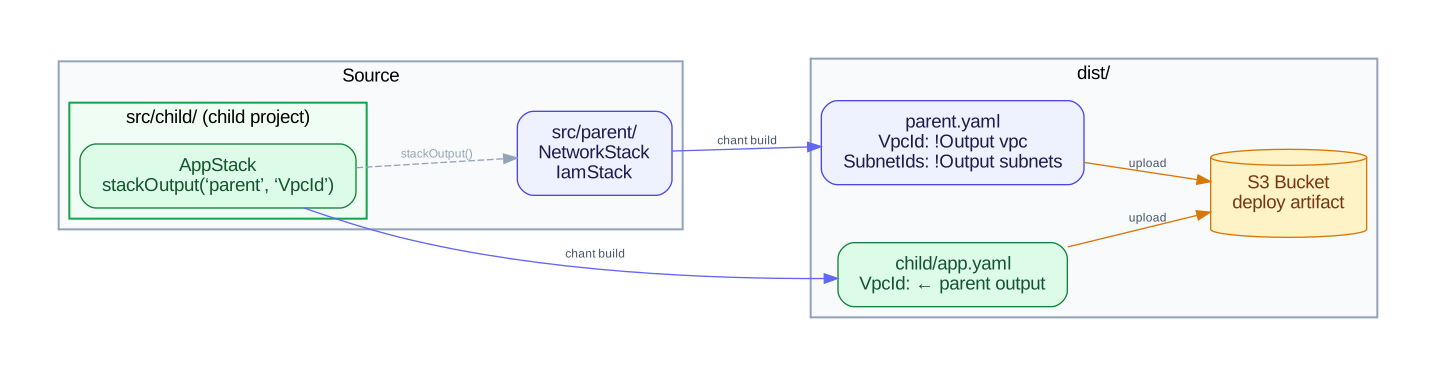
Read https://intentius.io/chant/lexicons/aws/nested-stacks/.Check first whether a separate stack (Multi-Stack Projects) or a composite fits better, as the page advises, and tell me which and why.If a nested stack fits, move the resources into a child project directory with `stackOutput()` declarations, reference it from the parent with `nestedStack()`, and run `npx chant build src -o template.json` and `npx chant lint src` until WAW013, WAW014 and WAW015 are clean.Open a pull request with the source and both templates; do not upload templates to S3 or run `aws cloudformation deploy`.Never deploy to a real cloud account or shared environment (with `chant run`, `chant components` or a platform's own CLI), approve (a pull request review, `chant approve` or `chant run approve`), override a policy denial (`chant approve policy-override`), or merge; never cut or publish a release (`chant release cut --yes` or `chant release publish`), push or delete a `ci/*` tag (`chant ci tick` pushes them), or change the value of an existing flag; never touch `.chant/allowed_signers` or `chant/lifecycle`.CloudFormation nested stacks (AWS::CloudFormation::Stack) split a large template into smaller, reusable child templates. The AWS lexicon’s nestedStack() function references a child project directory, a subdirectory that builds independently to a valid CloudFormation template.
Project structure
Section titled “Project structure”A nested stack is a child project: a subdirectory with its own resource files and explicit stackOutput() declarations:
src/ app.ts # parent resources network/ # ← child project (nested stack) vpc.ts # VPC, subnet, internet gateway, routing security.ts # security group for Lambda outputs.ts # declares cross-stack outputsDeclaring outputs in the child
Section titled “Declaring outputs in the child”Use stackOutput() to mark values that the parent can reference. Each stackOutput() becomes an entry in the child template’s Outputs section:
/** * Cross-stack outputs — values the parent can reference */
import { stackOutput } from "@intentius/chant";import { vpc, subnet } from "./vpc";import { lambdaSg } from "./security";
export const vpcId = stackOutput(vpc.VpcId, {  description: "VPC ID",});export const subnetId = stackOutput(subnet.SubnetId, {  description: "Public subnet ID",});export const lambdaSgId = stackOutput(lambdaSg.GroupId, {  description: "Lambda security group ID",});
The child can be built independently:
chant build src/network/ -o network.json# Produces a standalone, valid CloudFormation template with OutputsReferencing from the parent
Section titled “Referencing from the parent”Use nestedStack() in the parent to reference a child project directory. It returns an object with an outputs proxy for cross-stack references:
/** * App layer — Lambda function in the parent template that references * the network nested stack's outputs via cross-stack references */
import { Function, Sub, AWS, Ref, nestedStack } from "@intentius/chant-lexicon-aws";
// nestedStack() references a child project directoryconst network = nestedStack("network", import.meta.dirname + "/network", {  parameters: { Environment: "prod" },});
export const handler = new Function({  FunctionName: Sub`${AWS.StackName}-handler`,  Runtime: "nodejs20.x",  Handler: "index.handler",  Role: Ref("LambdaExecutionRole"),  Code: { ZipFile: "exports.handler = async () => ({ statusCode: 200 });" },  VpcConfig: {    SubnetIds: [network.outputs.subnetId],    SecurityGroupIds: [network.outputs.lambdaSgId],  },});
// Re-export so discovery picks it up as an entityexport { network };
network.outputs.subnetId produces a NestedStackOutputRef that serializes to { "Fn::GetAtt": ["Network", "Outputs.SubnetId"] }.
Build output
Section titled “Build output”chant build produces multiple template files:
chant build -o template.json# Produces:# template.json — parent template# network.template.json — child templateThe parent template includes an AWS::CloudFormation::Stack resource pointing to the child:
"Network": { "Type": "AWS::CloudFormation::Stack", "Properties": { "TemplateURL": { "Fn::Sub": "${TemplateBasePath}/network.template.json" } }}TemplateBasePath parameter
Section titled “TemplateBasePath parameter”Every parent template gets a TemplateBasePath parameter (default ".") that controls where CloudFormation looks for child templates:
# Local dev — default "." works with rain and similar toolschant build -o template.json
# Production — override with S3 URLaws cloudformation deploy \  --template-file template.json \  --stack-name my-stack \  --parameter-overrides TemplateBasePath=https://my-bucket.s3.amazonaws.com/templates
Child templates also receive the TemplateBasePath parameter so it propagates through all nesting levels.
All child template files must be uploaded alongside the parent template (or to the S3 path specified by TemplateBasePath).
Explicit parameters
Section titled “Explicit parameters”Pass CloudFormation Parameters to child stacks with the parameters option:
import { nestedStack } from "@intentius/chant-lexicon-aws";
const network = nestedStack("network", import.meta.dirname + "/network", {  parameters: { Environment: "prod", CidrBlock: "10.0.0.0/16" },});
Recursive nesting
Section titled “Recursive nesting”Child projects can themselves reference grandchild projects. Each level produces its own template file:
src/ app.ts infra/ network/ vpc.ts outputs.ts database/ cluster.ts outputs.tsThe build pipeline detects circular references and reports an error if child A references child B which references child A.
Planning a parent stack
Section titled “Planning a parent stack”A component that deploys the parent with cfn-deploy creates its change set with nested stacks included when the template declares an AWS::CloudFormation::Stack. Its plan, in chant components pr-plan or a gated wave, then lists each change inside a child as well as the change to the child stack itself. A change in a child is addressed by the child’s logical id and its own, for example Network/Subnet, and a grandchild’s as Infra/Network/Subnet. The child templates must already be at TemplateBasePath when the plan runs, since CloudFormation reads them there.
Lint rules
Section titled “Lint rules”Three lint rules catch common nested stack mistakes:
| Rule | Severity | Description |
|---|---|---|
| WAW013 | error | Child project has no stackOutput() exports — parent can’t reference anything |
| WAW014 | warning | nestedStack() outputs never referenced from parent — could be a separate build |
| WAW015 | error | Circular project references |
When to use nested stacks
Section titled “When to use nested stacks”Most splits fit one of these better:
- Splitting a large project into separately-deployed pieces: use Multi-Stack Projects. Organize
src/into subdirectories; each becomes an independent stack, deployed on its own, with cross-stack references resolved via standard CloudFormationExport/ImportValue. No parent template, no S3 upload of children, noTemplateBasePathparameter. - Reusing resource patterns within a single template: use Composites. Composites expand into the same template and deploy atomically.
Use nested stacks only when:
- A single deployable unit exceeds CloudFormation’s 500-resource limit
- You’re packaging reusable infrastructure for other teams to consume as a black box (the parent-child relationship is load-bearing)
- You need an orchestrator parent that coordinates child lifecycles via CloudFormation Parameters and Outputs specifically