
Identity
llms.txtlists every page for an agent
 Optional: hand this page to your coding agentThe steps work by hand too.
Show the whole prompt
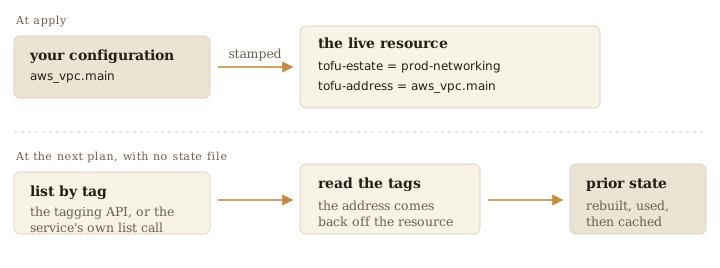
Read https://intentius.io/choudoufu/how-it-works/identity/ and list the resources here that only a marker can find again. Change no files. Never apply or destroy (`choudoufu apply`, `choudoufu destroy`, `tofu apply`), approve a saved plan, or merge; never edit or remove an owner tag by hand.A marker names the estate that owns a resource. The create call writes it, or a tag write right after it.
| Platform | Where identity lives |
|---|---|
| AWS | Tags tofu-estate and tofu-address, plus tofu-slot on pool members |
| Kubernetes | The tofu-estate label, with the address in an annotation |
| GCP | Labels tofu-estate and tofu-address, the address as a hash |
| Azure | Tags tofu-estate and tofu-address, keys matched case-insensitively |
On Kubernetes a plan finds each kind by the label and joins each object to its block on namespace and name, or on the address annotation.
Two ways back
Section titled “Two ways back”Where configuration names the resource, such as an S3 bucket, the marker confirms ownership. Where the platform assigns the id, such as a VPC, the marker finds it.
Types with no tags
Section titled “Types with no tags”An AWS type with no tags argument takes its identity from configuration, as
aws_iam_role_policy does.
Who may change it
Section titled “Who may change it”| Platform | The fence |
|---|---|
| AWS | IAM conditions on the tofu-estate tag (gate) |
| Kubernetes | One admission policy on the label (gate) |
Both bind the credential, so a plain aws or kubectl call meets the same
fence.
Renaming
Section titled “Renaming”choudoufu live-mv rewrites the marker (rename a
resource,
live/IDENTITY.md).