An "Outside the cluster" tab in Argo CD
The extension adds one tab, “Outside the cluster”, to Argo CD’s Application details panel and to the panel of each resource in the Application. It reads the live objects through Argo CD’s own API, applies behold’s placeholder rules and neighbourhood cut in the browser, and lists the results as cards. It needs no behold server.
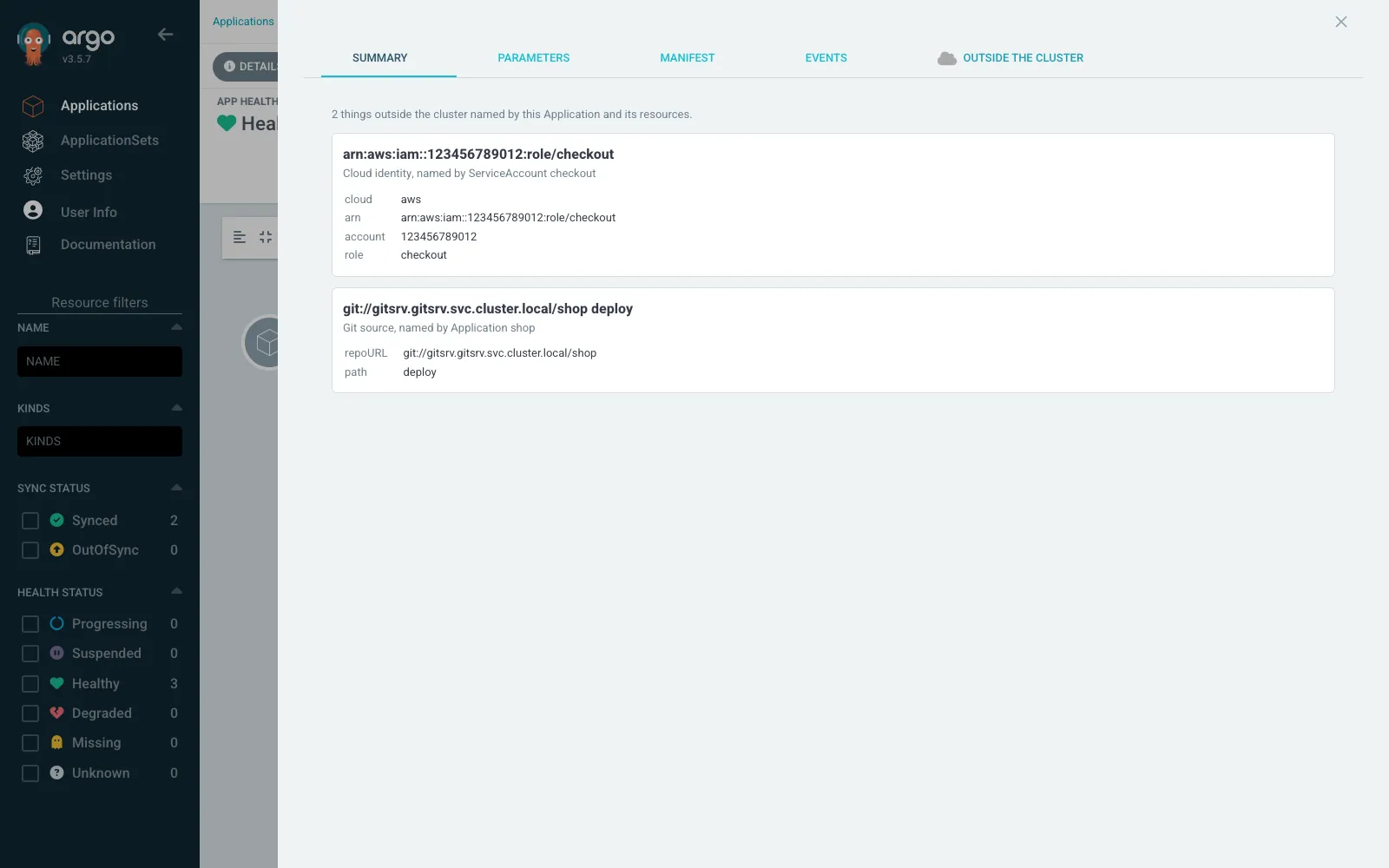
- On a ServiceAccount, the tab shows the cloud identity its annotation names (an
eks.amazonaws.com/role-arngives an IAM role card). - On an ExternalSecret, SecretStore or ClusterSecretStore it shows the secret store and provider they name, and on a Flux Kustomization or GitRepository the Git source.
- On the Application, it lists every such card across the Application’s resources, with the object that names each one, plus the Git source of the Application itself.
- On any other resource, it shows the cards within reach of that object, or says there are none.
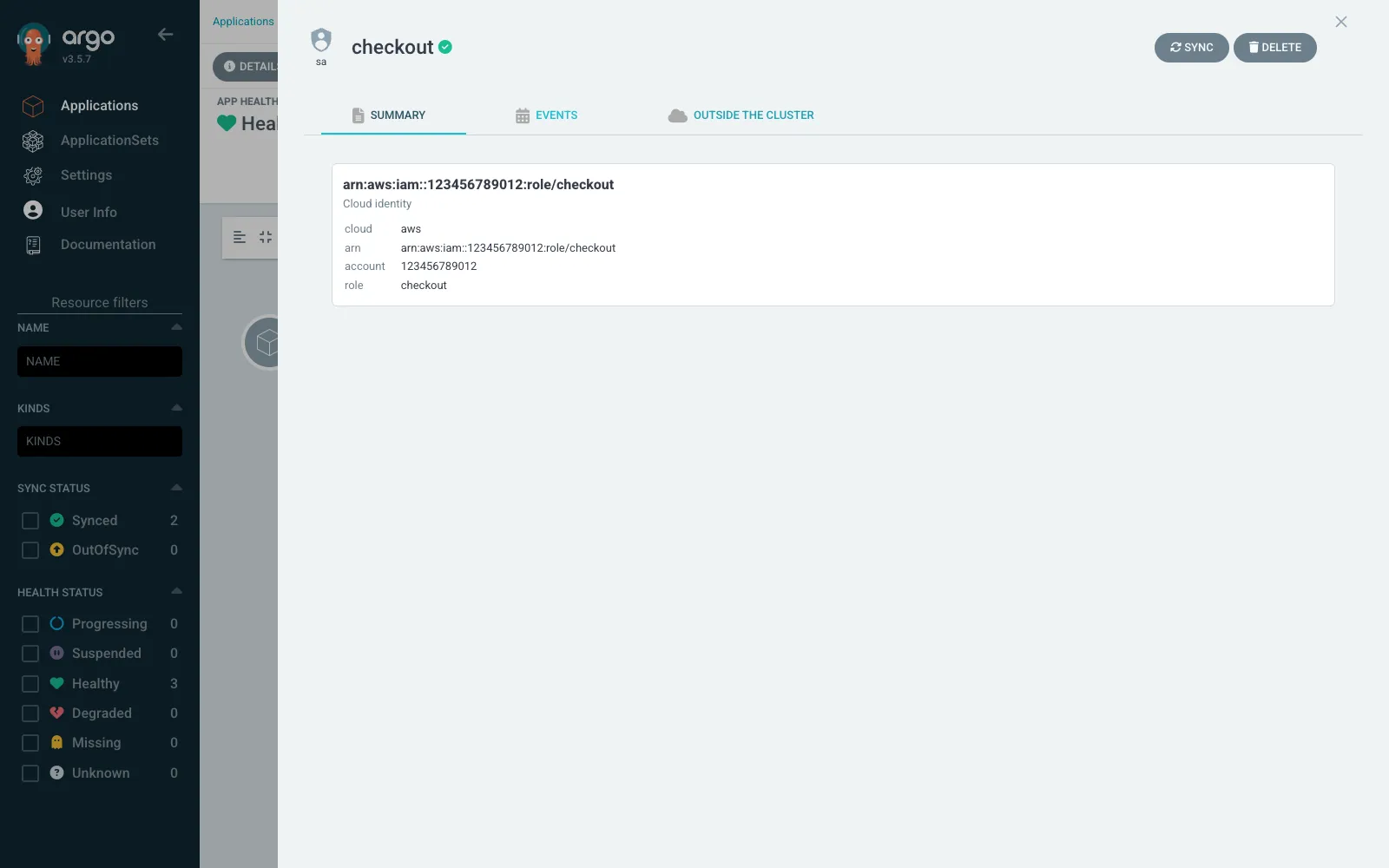
The tab reads each object with the signed-in user’s session, so it shows an object only when that user may see it in Argo CD. It reads ServiceAccount, ExternalSecret, SecretStore, ClusterSecretStore, Application, Kustomization and GitRepository objects from the Application’s resource tree and ignores the rest.
Install
Section titled “Install”Argo CD loads a UI extension from /tmp/extensions in the argocd-server pod,
from a file named extension*.js. There are two ways to put the file there.
Both need Argo CD 3.5 or later: the extension is built against React 19 and
takes react and react/jsx-runtime from the host, as the Argo CD
3.4 to 3.5 upgrade notes
describe. An Argo CD 3.4 or older does not provide window.ReactJSXRuntime.
With the extension installer
Section titled “With the extension installer”Each release of argocd-behold-v<version> on GitHub holds
argocd-behold-<version>.tar.gz and checksums.txt. The
argocd-extension-installer
init container downloads the tarball, checks it against the checksum file and
unpacks it into the shared volume.
With the Argo CD Helm chart:
server: extensions: enabled: true extensionList: - name: behold env: - name: EXTENSION_NAME value: behold - name: EXTENSION_VERSION value: 0.1.0 - name: EXTENSION_URL value: https://github.com/INTENTIUS/behold/releases/download/argocd-behold-v0.1.0/argocd-behold-0.1.0.tar.gz - name: EXTENSION_CHECKSUM_URL value: https://github.com/INTENTIUS/behold/releases/download/argocd-behold-v0.1.0/checksums.txt # optional, see "A default export URL" below - name: EXTENSION_JS_VARS value: '{"export_url": "https://behold.example.com/api/graph?detail=3"}'With kustomize, patch the argocd-server Deployment from the stock
install.yaml. The chart’s extensions volume is an emptyDir mounted at
/tmp/extensions, and the patch adds the same:
patches: - target: {kind: Deployment, name: argocd-server} patch: |- - op: add path: /spec/template/spec/volumes/- value: {name: extensions, emptyDir: {}} - op: add path: /spec/template/spec/containers/0/volumeMounts/- value: {name: extensions, mountPath: /tmp/extensions} - op: add path: /spec/template/spec/initContainers value: - name: extension-behold image: quay.io/argoprojlabs/argocd-extension-installer:v0.0.9@sha256:d2b43c18ac1401f579f6d27878f45e253d1e3f30287471ae74e6a4315ceb0611 env: - {name: EXTENSION_NAME, value: behold} - {name: EXTENSION_VERSION, value: 0.1.0} - {name: EXTENSION_URL, value: "https://github.com/INTENTIUS/behold/releases/download/argocd-behold-v0.1.0/argocd-behold-0.1.0.tar.gz"} - {name: EXTENSION_CHECKSUM_URL, value: "https://github.com/INTENTIUS/behold/releases/download/argocd-behold-v0.1.0/checksums.txt"} - {name: EXTENSIONS_DIR, value: /tmp/extensions} volumeMounts: - {name: extensions, mountPath: /tmp/extensions} securityContext: {runAsUser: 1000, allowPrivilegeEscalation: false}Use the installer tag your Argo CD chart carries if it is newer, and keep the
digest next to the tag. The argocd-server pod needs network access to the
release URLs; a mirror inside your network works if you point both URLs at it.
With a ConfigMap
Section titled “With a ConfigMap”Where the pod cannot reach GitHub, put the built file in a ConfigMap and mount
it. The file is about 40 KB, well inside a ConfigMap’s 1 MiB. Take
extension-behold.js from the release tarball (resources/extension-behold.js/),
then:
tar xzf argocd-behold-0.1.0.tar.gzkubectl -n argocd create configmap behold-extension \ --from-file=extension-behold.js=resources/extension-behold.js/extension-behold.jsand add to the argocd-server Deployment:
spec: template: spec: volumes: - name: behold-extension configMap: {name: behold-extension} containers: - name: argocd-server volumeMounts: - name: behold-extension mountPath: /tmp/extensions/beholdUse one of the two ways, not both: a second copy registers a second tab.
Check that it loaded
Section titled “Check that it loaded”Open an Application and its Details panel. The “Outside the cluster” tab sits
after Events. If the extension fails to load, Argo CD says so in the browser
console as Extension behold.js failed to load: TypeError: .... On Argo CD 3.5
that points to a build that bundles its own React JSX runtime; this extension’s
build leaves it to the host, and the repository’s test checks that.
A default export URL
Section titled “A default export URL”By default the tab reads only the objects Argo CD shows it. It can also read a
behold graph (a behold export file, or behold serve’s
/api/graph?detail=3), so that a target the graph already holds gets no
placeholder card. Two places give it the URL:
- the install default, from the installer’s
EXTENSION_JS_VARS, which the installer writes aswindow.BEHOLD_VARS; its keys are upper-cased, soexport_urlbecomesEXPORT_URL; - an Application annotation, which wins over the default:
metadata: annotations: behold.intentius.io/export-url: 'https://behold.example.com/api/graph?detail=3'The browser fetches the URL itself, so it must be served with CORS headers for the Argo CD origin and over HTTPS when Argo CD is. A URL that cannot be read is ignored and the tab works without it.
Build and test it
Section titled “Build and test it”The code is in surfaces/argocd-behold. It reuses the model of the Headlamp
plugin beside it (surfaces/headlamp-behold/src/model.ts and the copies of
web/cut-around.js, web/neighbourhood.js and web/outside-refs.js kept in
src/behold/), so a change to a placeholder rule reaches both.
cd surfaces/argocd-behold npm ci && npm run tsc && npm test npm run build && npm run package
just argocd-extension-e2e creates a k3d cluster named behold-argocd-ui,
installs Argo CD v3.5.7 in full (not core-install, which has no UI), installs
the extension through the installer, syncs an Application from a git
repository served inside the cluster and drives the UI in Chrome. It leaves the
cluster running.
Listing and releases
Section titled “Listing and releases”Argo CD keeps no catalog of extensions, so a user installs this one as above.
Each release on GitHub, tagged argocd-behold-v<version>, holds the tarball
and checksums.txt. Any public listing, such as a link from the
Argo CD extensions page or an argoproj-labs repository, is a separate
request to that project.