Agent Integration
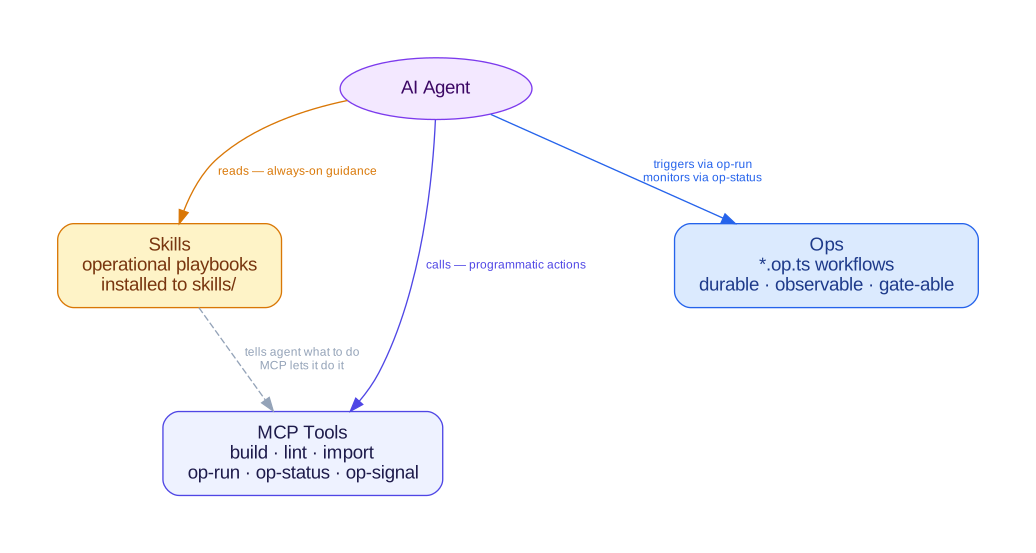
chant integrates with AI coding agents through three surfaces: skills (operational knowledge), MCP tools (programmatic actions), and Ops (declared deployment phases). You write TypeScript; the agent uses these to build and deploy it and to troubleshoot failures.

Skills
Section titled “Skills”Skills are Markdown playbooks that lexicons contribute. Each tells an agent how to work with one platform: which commands to run, what to validate, how to deploy, and how to troubleshoot failures.
Skills are installed by chant init and refreshed by chant update. They live in the project root at skills/:
my-project/ skills/ chant-aws/ SKILL.md chant-aws-eks/ SKILL.md src/ index.tsAgents that support file-based skill discovery load these automatically.
Skill files are for the agent, which reads them as needed.
MCP Tools
Section titled “MCP Tools”The MCP (Model Context Protocol) server gives agents programmatic access to chant operations. When an agent connects via MCP, it can build projects, run lint checks, scaffold files, and more without the user typing commands.
chant init configures MCP automatically by writing to your IDE’s global MCP config file.
To configure manually, add the chant MCP server to your IDE’s MCP config:
{ "mcpServers": { "chant": { "command": "npx", "args": ["chant", "serve", "mcp"] } }}Available Tools
Section titled “Available Tools”| MCP tool | Description |
|---|---|
build | Synthesize infrastructure output |
lint | Run lint checks on TypeScript intent definitions |
import | Import infrastructure templates and generate TypeScript files |
explain | Summarize project resources by lexicon and kind |
scaffold | Generate starter files from lexicon templates |
search | Search resource types and composites across lexicons |
composites | List the composites a lexicon exports, with what each bundles and its parameters |
lifecycle-snapshot | Capture deployed state for an environment |
lifecycle-diff | Compare the current build against an environment’s last snapshot |
op-list | List discovered Ops with the run state a runtime reports |
op-run | Run an Op on a runtime and return its result |
op-status | Show the state of an Op’s latest run |
op-approve | Record a gate’s resolution, unless the gate arrived over this same channel |
op-report | Return a markdown report for an Op’s latest run |
The parameters each one takes, and what it returns, are in the chant serve mcp reference. Read the op-approve entry there before wiring up an approval flow: a gate an agent’s own op-run reached cannot be resolved over MCP, which keeps the two halves of an approval in different hands.
Workspace Tools
Section titled “Workspace Tools”A server started inside a declared workspace also has tools for the workspace’s records (#2707). A harness with no shell reads decisions and proposes new ones through them.
| MCP tool | Description |
|---|---|
workspace-ls | The members and groups, as chant workspace ls --json prints them |
workspace-status | What each member has released to an environment, its gates, and its steward with each Op’s last run |
workspace-graph | The workspace graph, the intent graph over a region, or the composites joined to components |
workspace-changes | The forward coverage check over a diff: each changed path with the records covering it, and the uncovered or out-of-scope ones |
workspace-records | The records of a kind, with quorum and warnings, or what changed since a revision |
workspace-points | The workspace’s decision points, and the questions asked of them, with the open ones a person answers |
workspace-agent | An agent session’s member, write scope and the spec it reloads from |
workspace-work-history | A work item’s lease history: each claim, and whether it was released, with what outcome, or never released |
workspace-runs | The agent runs: who each worked for, its model, tokens and cost, and the commits it made |
records-new | Propose a record; it opens proposed and says it came through MCP |
records-amend | Set fields of a record, under the same approval rule as the CLI |
records-review | Give a verdict, which moves the record’s quorum |
records-close | Close and seal a review session |
points-answer | Record people’s answer to an open decision point question, or confirm a model’s proposal |
points-retract | Take people’s answer back, so the question is open for them again |
points-withdraw | Close an open question that no longer applies, such as one about a changed work item |
A record written this way is a proposal until people review it. by must name whoever actually decided.
To bind a harness to one member, declare an agent session and start the server with CHANT_AGENT=<name>. Its record writes are then held to the session’s write scope, and the agent resumes from workspace-agent (or chant workspace agent <name>) with no state of its own. Commits it makes carry a Chant-Agent: <name> trailer, so chant workspace check --changes in CI judges them as the session (#2548).
Resources
Section titled “Resources”| MCP resource | Description |
|---|---|
chant://context | Lexicon-specific instructions and patterns for chant development |
chant://examples/list | List of available chant examples |
chant://composites | Every composite the loaded lexicons export |
Lexicon plugins can contribute additional tools and resources. The chant serve mcp reference lists every core resource the server serves, the knowledge bundle and per-environment state among them.
Read-only context tools
Section titled “Read-only context tools”Some lexicons add read-only context tools that build from your source and return what chant already computes, without touching any live system. They tell an agent what a change does, what it pulls in, and whether it is safe, before it runs or merges, which live tooling can’t see.
The GitLab lexicon ships these:
| MCP tool | Answers |
|---|---|
gitlab:checks | Is there anything risky in this pipeline? (returns the security findings) |
gitlab:pipeline | What does this pipeline do? (stages, jobs, run order) |
gitlab:references | What does it pull in from outside, and is it pinned? |
gitlab:affected | If I change this job, what re-runs? |
gitlab:pipeline-yaml | The generated .gitlab-ci.yml |
gitlab:source | Where did this job come from in my TypeScript? (file + composite) |
gitlab:owns | Is this job declared by chant in this project? |
gitlab:compare | If I migrate this GitHub workflow to GitLab, which safety properties survive? |
The GitHub lexicon ships the parallel set for Actions workflows:
| MCP tool | Answers |
|---|---|
github:checks | Is there anything risky in this workflow? (returns the security findings) |
github:workflow | What does this workflow do? (triggers, jobs, run order) |
github:references | What actions/images does it pull in, and are they pinned to a commit SHA? |
github:affected | If I change this job, what re-runs? |
github:workflow-yaml | The generated workflow YAML |
The Forgejo lexicon (Codeberg / self-hosted Forgejo / Gitea) ships the same set, plus the migration safety view:
| MCP tool | Answers |
|---|---|
forgejo:checks | Is there anything that won’t work on Forgejo? (WFJ findings: unresolved action refs, GitHub-hosted runner labels) |
forgejo:workflow | What does this workflow do? (triggers, jobs, run order) |
forgejo:references | What actions/images does it pull in, and are they pinned to a commit SHA? |
forgejo:affected | If I change this job, what re-runs? |
forgejo:workflow-yaml | The generated Forgejo workflow YAML |
forgejo:source | Where did this job come from in my TypeScript? (file + composite) |
forgejo:owns | Is this job declared by chant in this project? |
forgejo:compare | If I migrate this GitHub workflow to Forgejo, which safety properties survive? |
Every one of these reads only the build, never a live instance or run history, and none of them writes. That boundary is deliberate, so chant adds context beside the live tooling an agent already uses.
Ops are named, phased workflows defined in *.op.ts files. They run deployments as declared phases, with gate steps that stop for a person and onFailure phases that compensate, and each run’s steps land on the run ledger as they settle.
# Run an Op here, in this processchant run alb-deploy
# Record a gate's resolution, then wake the hosting runtimechant run approve alb-deploy gate-dns-delegation --approver alex
# Or hand the run to a fountain stewardchant run alb-deploy --on fountain
The MCP server exposes Op tools (op-list, op-run, op-status, op-approve, op-report) so agents can start and monitor deployments programmatically. Each takes an optional runtime, the same choice --on makes on the command line.
An agent meets a gate the same way a person does. The run exits 3 with the pending fact and the approve line, so an agent can report “waiting on approval” rather than treating it as a failure, and it can neither hurry the decision nor route around it. See the Ops guide for details, and chant acp for chant as an agent an editor or sandbox drives directly.
When to Use What
Section titled “When to Use What”| Surface | When | Example |
|---|---|---|
| Skills | Always-on guidance, installed once and read as needed | Agent checks the AWS skill before deploying a CloudFormation stack |
| MCP tools | Programmatic actions during execution | Agent calls build to synthesize templates, lint to validate, op-run to start a deployment |
| Ops | Multi-step workflows with a record and gate steps | Deploying infra + app layers, stopping for DNS delegation, rollback on failure |
Skills tell the agent what to do; MCP tools let it do it. Ops are repeatable workflows that leave a record a person can read afterwards.