Ops
Show the whole prompt
Read https://intentius.io/chant/guide/ops/.
Write the Op I describe as a `*.op.ts` file, with a `gate()` step before any phase that changes a shared environment, and an `onFailure` phase where the page's compensation applies.
Run `npx chant build` and `npx chant lint` until both pass. To try the toolchain, write the page's `hello.op.ts` and run `npx chant run hello --no-record`, and show me the output.
Open a pull request with the Op. Print the approve and run commands for its gates for me to run.
Never deploy to a real cloud account or shared environment (with `chant run`, `chant components` or a platform's own CLI), approve (a pull request review, `chant approve` or `chant run approve`), override a policy denial (`chant approve policy-override`), or merge; never cut or publish a release (`chant release cut --yes` or `chant release publish`), push or delete a `ci/*` tag (`chant ci tick` pushes them), or change the value of an existing flag; never touch `.chant/allowed_signers` or `chant/lifecycle`.Optional: hand this page to your coding agent
Read https://intentius.io/chant/guide/ops/.Write the Op I describe as a `*.op.ts` file, with a `gate()` step before any phase that changes a shared environment, and an `onFailure` phase where the page's compensation applies.Run `npx chant build` and `npx chant lint` until both pass. To try the toolchain, write the page's `hello.op.ts` and run `npx chant run hello --no-record`, and show me the output.Open a pull request with the Op. Print the approve and run commands for its gates for me to run.Never deploy to a real cloud account or shared environment (with `chant run`, `chant components` or a platform's own CLI), approve (a pull request review, `chant approve` or `chant run approve`), override a policy denial (`chant approve policy-override`), or merge; never cut or publish a release (`chant release cut --yes` or `chant release publish`), push or delete a `ci/*` tag (`chant ci tick` pushes them), or change the value of an existing flag; never touch `.chant/allowed_signers` or `chant/lifecycle`.Deciding whether Ops is the right deployment model for your project? See Choosing Your Deployment Model.
Ops are named, phased workflows defined in *.op.ts files (the chant feature, not “operations” in general). An Op replaces an ad-hoc deployment script: progress prints as the run goes, gate steps stop for a human approval recorded on the gate ledger, and onFailure phases run compensation when a step fails.
When to reach for an Op
Section titled “When to reach for an Op”- A long-running deploy, where you want to see the current phase without grepping logs.
- A stop for human approval or an external event (DNS delegation, change windows).
- Rollback on failure, with
onFailurephases in place of hand-rolled scripts.
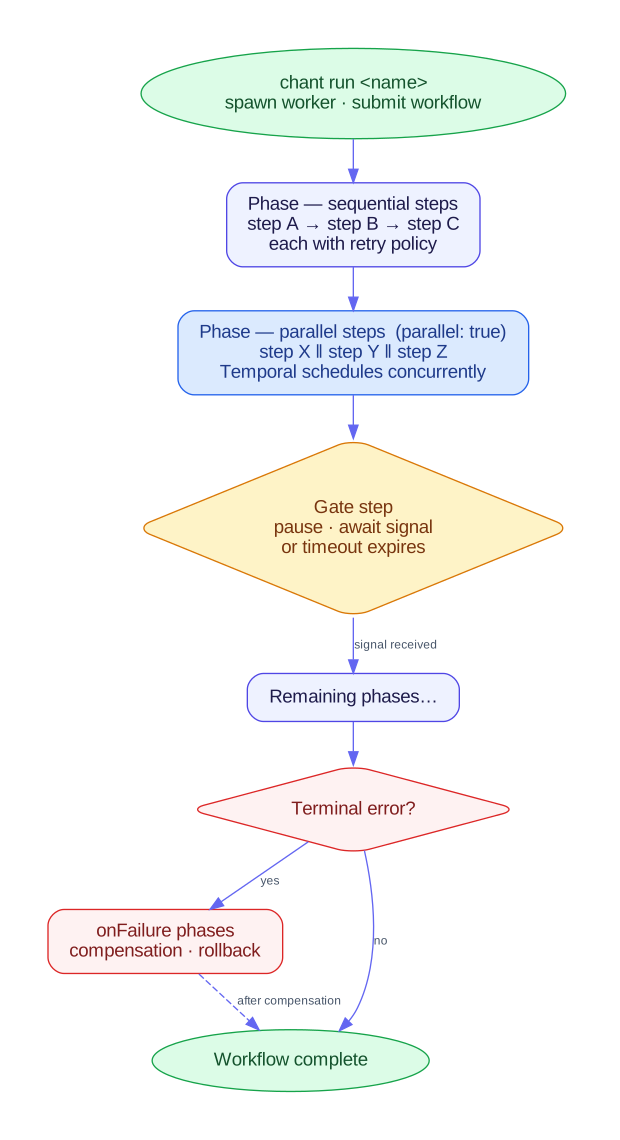
chant run <name> executes an Op in this process. --on <lexicon> hands the same Op to a runtime that hosts it instead, and chant run <op> --on fountain is the one chant ships: a steward runs it on a machine of its own and keeps the record in one long-lived conversation. See Ops as teammates for what each half is for.

Defining an Op
Section titled “Defining an Op”Create a *.op.ts file anywhere in your project:
import { Op, phase, shell } from "@intentius/chant/op";import { kubectlApply } from "@intentius/chant-lexicon-k8s/op/builders";
export default Op({  name: "alb-deploy",  overview: "Deploy the ALB infra then the application layer",  phases: [    phase("Infra", [      kubectlApply("dist/infra.yaml", { profile: "longInfra" }),    ]),    phase("App", [      kubectlApply("dist/k8s.yaml"),      shell("kubectl rollout status deployment/api"),    ]),  ],});
Try it locally
Section titled “Try it locally”Check your toolchain first with a shell-only Op. Save as hello.op.ts anywhere in your project:
import { Op, phase, shell } from "@intentius/chant/op";
export default Op({  name: "hello",  overview: "Smallest possible Op — one shell step",  phases: [    phase("Greet", [shell("echo hello from chant")]),  ],});
Then run it.
chant run helloThe Op ran in this process. Once it works, swap shell() for kubectlApply(), helmInstall(), or any other step builder to start deploying real resources.
Phases and steps
Section titled “Phases and steps”Each phase() has a name and an ordered list of steps. All steps in a phase run sequentially by default. Set parallel: true to run them concurrently via Promise.all.
A reconcile activity is also available via activity("reconcilePr", args): given the change-set entries that triggered it, it regenerates TypeScript with chant import --from <env> and opens a reviewable PR (modes: pull-request, issue, comment, report). It never commits to the main branch. The reconcile workflow (cloud -> code) is built on it.
comment mode is the one that constrains its trigger. The body lands as a single comment on the pull request that triggered the run. Every re-run edits that same comment instead of adding another; the activity finds it again by a hidden marker written as the comment’s first line. A branch pushed to five times then carries one current body instead of five stale ones. GitHub and Forgejo read the pull request out of the run’s own event payload (GITHUB_EVENT_PATH, with GITHUB_REF as the fallback). GitLab gets the body as a note on the merge request named by CI_MERGE_REQUEST_IID. So the mode requires a pull request or merge request trigger and fails by name on a run without one. The generated GitHub workflow gets exactly contents: read and pull-requests: write.
issue mode needs no trigger, so a cron Op with a nightly finding can use it. It is sticky the same way comment mode is: a hidden marker on the first line of the issue body finds the one this Op already owns, and a re-run edits it in place instead of opening another. This holds on GitHub, GitHub Enterprise Server, and Forgejo alike, each read off GITHUB_REPOSITORY since a GitHub Actions and a Forgejo Actions job set it the same way, and on GitLab CI, read off CI_PROJECT_ID, as its own project issue. It never closes the issue itself, on either forge (a tool posting through trackIssue can opt in to that). The search reads only OPEN issues. Closing the issue by hand once its finding is fixed tells the next run to open a fresh issue for a fresh finding, so the bot never rewrites a closed issue nobody is watching. Reopening a closed issue on the next finding was considered and rejected: this activity has no reliable signal for “the last finding got fixed” as opposed to “this run happened not to check.”
That marker decides which issue a run edits, so it has to name the Op. issue mode fails by name on a step that gives it nothing to name one with. Pass op with the enclosing Op’s own name; TerraformWatchOp and ReconcileOp both do that for you. An env on its own is not enough. Two watch Ops over one terraform root share an env. So do a terraform root and a chant environment that happen to be spelled the same. Whichever of the pair ran second used to rewrite the other’s issue title and body on every run. The other way is to supply marker yourself, and then keeping it unique is your job. A blank or whitespace-only marker counts as no marker and is refused, because an empty one matches every issue in the repository rather than none. So does one containing a double quote or a backslash, which the search filter cannot carry. An issue opened before this rule existed carries the older env-only marker that no Op matches now. It stays open and untouched until you read it and close it yourself.
Both modes call the forge’s REST API from inside chant run, so a CI job needs no gh or glab on its image, and both read their token the same way. The order is pr-forge’s FORGE_TOKEN_ORDER, the one the pull-request loop reads, and it depends on the forge. GitHub reads CHANT_GITHUB_TOKEN, then GH_TOKEN, then GITHUB_TOKEN. Forgejo reads CHANT_FORGEJO_TOKEN, FORGEJO_TOKEN, GH_TOKEN, then GITHUB_TOKEN. The first one set is sent with every call. A GitHub Actions or Forgejo Actions job already sets GH_TOKEN and GITHUB_TOKEN from github.token, so the ordinary case needs nothing extra. A GitHub run no longer reads CHANT_FORGEJO_TOKEN (#3807): if you set it on a GitHub run, rename it to CHANT_GITHUB_TOKEN, or the run falls back to GH_TOKEN. Set CHANT_FORGEJO_TOKEN when the run has to post to a Forgejo instance other than the one it executes on, since github.token does not reach past its own host, and point GITHUB_API_URL at that instance’s /api/v1. A GitLab job takes CHANT_GITLAB_TOKEN when it is set, else GITLAB_TOKEN, else the job’s own CI_JOB_TOKEN. A run with no token fails by name before it calls the forge. The exception is a local run outside any CI job, which opens its issue through gh issue create and leaves the credential to your own gh auth login.
Posting from your own tool
Section titled “Posting from your own tool”A tool that keeps its own comment, status or tracking issue can post through the same clients without running an Op. @intentius/chant/pr-forge exports them for GitHub, GitLab and Forgejo (#3759):
| Export | What it does |
|---|---|
forgeTargetFromEnv(env, { kind?, tokenEnv?, requirePr? }) | reads the forge, the repository, the REST base, the host, the token and, when the run has them, the pull request and its head commit from a CI job’s environment. The token is read from tokenEnv alone when it is given. Otherwise a GitHub job reads CHANT_GITHUB_TOKEN, GH_TOKEN, GITHUB_TOKEN; a Forgejo job reads CHANT_FORGEJO_TOKEN, FORGEJO_TOKEN, GH_TOKEN, GITHUB_TOKEN; a GitLab job reads the order above. The order is exported as FORGE_TOKEN_ORDER. A missing piece throws ForgeEnvironmentError, whose missing names each variable to set |
detectForge(env) | github, gitlab or forgejo from the job’s environment, or undefined outside one |
forgeClient(target, fetch?) | the client for a target. githubForge, gitlabForge and forgejoForge build one by hand |
client.upsertComment(pr, marker, body, { match?, author? }) | keeps one comment on the pull request, or one note on the merge request: created, updated, or unchanged when the body is already current. The match is a prefix by default, anywhere when the marker sits inside the body, and author keeps only comments that login wrote. author also takes a list, and a comment by any login in it counts, for a bot whose login the job cannot know in advance (#3834) |
client.findComment(pr, marker, { match?, author? }) | reads back the comment upsertComment would update, as { id, body, url? }, or undefined when there is none. With author set, a comment someone else wrote with the same marker is never the one returned (#3802) |
client.addComment(pr, body) | posts a new comment (a new merge request note on GitLab) every call, with no marker and no read first, and returns { id, url? }. For replies that are never edited (#3818) |
client.setStatus(sha, { context, state, description, url?, pipelineId? }) | sets a commit status. state is one of pending, running, success, failed, canceled, failure or error, and each forge is sent its nearest state (below). The description is cut to what the forge keeps, and GitLab’s refusal to set a status to the state it already has is not an error |
client.trackIssue(marker, finding, { closeOnClear?, clearComment?, sameWhen? }) | keeps one open tracking issue: opened, updated or unchanged for a finding. A null finding leaves the issue open and reports it as left, unless closeOnClear is set, which posts clearComment and closes it. By default the issue is unchanged only when its title and body equal the finding’s. sameWhen widens that for a body that names its run: a string counts the issue as unchanged when the titles match and its body carries the string (a fingerprint, say), and a function (open, finding) => boolean decides on its own. An unchanged issue is not edited |
client.openPullRequest({ head, base?, title, body, draft? }) | opens a pull request from branch head, or a merge request on GitLab, over REST on all three forges, so it works on Forgejo where gh pr create cannot (#3798). Without base it targets the repository’s default branch, read from the forge. draft is GitHub’s draft flag, a Draft: title prefix on GitLab and WIP: on Forgejo. Returns { number, url?, title, body, head, base? } |
client.findPullRequest(head) | the open pull request whose head is branch head in this repository, or undefined. A fork’s branch of the same name is never it. Forgejo answers the pull list with 404 while it still counts a repository as empty (just after the first push); that is read as no pull request, after a read of the repository itself confirms it exists (#3845) |
client.mergePullRequest(number, { sha, method?, title?, message?, deleteBranch? }) | merges the pull request only while its head is still sha. method is merge (default), squash or rebase; GitLab has no one-call rebase merge and refuses it. A moved head, a conflict or a rule the forge enforces returns { merged: false, reason } instead of throwing; auth and server errors still throw. A merge returns { merged: true, sha? }. Over REST on all three forges: GitHub PUT /pulls/{n}/merge with sha, Forgejo POST /pulls/{n}/merge with head_commit_id, GitLab PUT /merge_requests/{iid}/merge with sha |
client.editPullRequest(n, { title?, body? }) and client.addLabels(n, labels) | change an open pull request’s title or body, and add labels by name. Forgejo adds only a label the repository already has |
client.findIssue(marker, { match?, author? }) | reads the open issue trackIssue would keep, as { number, title, body, created?, url? }, or undefined. It writes nothing, and a client built without token sends no credential, which is enough to read a public repository. trackIssue also returns the issue’s opened time as created (the forge’s created_at) |
GitLab keeps running and canceled and GitHub keeps error, so a state one forge lacks is sent as its nearest one (#3834). Forgejo takes GitHub’s column. statusStateFor(kind, state) returns what a forge is sent.
state | GitHub, Forgejo | GitLab |
|---|---|---|
pending | pending | pending |
running | pending | running |
success | success | success |
failed, failure | failure | failed |
canceled | error | canceled |
error | error | failed |
The same author list works for findComment, trackIssue and findIssue. On Forgejo the job token’s login is gitea-actions or forgejo-actions depending on the version, so a tool that reads its own note back on GitHub and Forgejo passes author: ["github-actions[bot]", "gitea-actions", "forgejo-actions"]. Logins compare without case, and an empty list matches no one.
closeOnClear is off by default, matching issue mode, which never closes an issue. Only open issues are read in both, so a closed issue is never reopened and the next finding opens a fresh one. A tool that can tell a cleared finding from a run that did not check turns it on. The bodies are the caller’s, and each one has to carry its marker, or the call is refused before it reaches the forge. Every client takes a fetch, so a tool’s tests need no network. The module imports nothing but node:fs, which it uses to read the event payload. Bundled with esbuild for node, it comes to about 50 KB (packages/core/src/pr-forge-bundle.test.ts:38 holds it under 52 KiB). That test also fails when anything else joins the bundle.
Passing a value from one step to the next
Section titled “Passing a value from one step to the next”Give a step an id and later steps can read what it returned. shell() publishes stdout, stderr (both trimmed) and exitCode (#2413).
const host = shell("terraform output -raw db_host", { id: "host" });
phase("Smoke", [  host,  shell("./smoke.sh", { env: { HOST: host.out.stdout } }),]),
The reference is inert until the run resolves it, so nothing is interpolated at build time, and OPS013 checks it against the producer’s declared return type before chant build emits.
A step in onFailure can read any main-phase step, and a step inside an effect() can read any step that runs before the effect (#3948). A step inside an effect can’t be read by anything else, because it runs only when the effect fires.
cmd itself takes no references and stays a plain string. A value spliced into a command line is a quoting decision, and env carries the same value into the same command with the shell’s own rules intact.
A non-zero exit still fails the step. okExit names the codes that do not, which is what makes exitCode worth reading at all. A command that reports its answer through its exit status, the way diff and grep do, then becomes a value a later step can branch on rather than a failed run.
const changed = shell("git diff --quiet HEAD~1 -- migrations/", { okExit: [0, 1], id: "changed" });With json: true, stdout is parsed as JSON and published as json (#2787). A list or an object then reaches the next step, or the Op’s workLease.item, as itself rather than as a string. Stdout that is not JSON fails the step, and empty stdout is null. The parsed value’s shape is the command’s own, so OPS013 accepts a reference to the whole of it, pick.out.json, and not to a path inside it. A command that has more than one thing to say prints an object. A later command gets the same text through env from pick.out.stdout, since an environment value is a string.
A shell step runs under atMostOnce: twenty minutes, one attempt. timeout gives the step a longer or shorter attempt, up to six hours, and keeps the one attempt. See Retry profiles.
const pick = shell("node ops/pick.mjs", { id: "pick", json: true }); // prints ["W-3","W-7"]const build = shell("node ops/build.mjs", { id: "build", timeout: "45m" });A command that stops at its own gate
Section titled “A command that stops at its own gate”Some commands decide a gate themselves. chant workspace upgrade stages its patch, records workspace-upgrade / <scope> pending on the gate ledger, and exits 3 until someone runs chant approve workspace-upgrade <scope>. Name that exit code in gatedExit and the step stops its run at the command’s gate (#2779). The run ends gated there as it would at a pending gate step. Nothing after the step runs and a work lease is released gated. The run ledger records the gate with the op it is recorded under.
const upgrade = shell("chant workspace upgrade . --to ~/box/template --json", {  id: "upgrade",  cwd: workLeaseOutput("worktree"),  gatedExit: 3,});
export default Op({  name: "upgrade",  overview: "Upgrade the workspace in a work-lease worktree once a person approves the patch.",  changesCheckout: true,  workLease: { item: "workspace-upgrade" },  phases: [phase("Upgrade", [upgrade])],});
The step reads the gate from the command’s stdout when that is JSON with a pending fact, which chant workspace upgrade --json prints. A command that prints something else names its gate in gate, as { op: "workspace-upgrade", gate: "." }, and the step stops at the newest pending fact for it on the gate ledger. With neither, the step fails, since a run can’t wait at a gate nobody can approve. gatedExit is checked before okExit.
After chant approve workspace-upgrade . the next run runs the command again. This time the command finds the approval and applies the patch, and the run ends ok. A local steward runs its own gated run again on its first round after the approval (see operator --steward). chant workspace status --json shows the gate on the Op’s lastRun while it waits.
Reporting progress from a shell step
Section titled “Reporting progress from a shell step”chant run prints a shell step’s output on stderr as each line arrives, as [<phase>] <step> | <line>, and prints [<phase>] <step>: still running after <n>s for a step that has been quiet for 60 seconds (CHANT_STEP_HEARTBEAT sets the interval). A watchdog that reads the run’s output sees a long step working. See run <name>.
A run started by chant run or a steward keeps an in-flight record while it runs, which chant workspace status --json shows as the Op’s inFlight. A shell step’s command finds the record’s activity file in CHANT_RUN_ACTIVITY and the run’s id in CHANT_RUN_ID. Each line it appends is one activity line, either plain text or {"at": "<ISO-8601>", "text": "..."}:
echo "Bash npm test" >> "$CHANT_RUN_ACTIVITY"Outside such a run the variable is unset. An in-process activity calls reportRunActivity(text) from @intentius/chant/op instead.
Gate steps
Section titled “Gate steps”A gate is a fact on the gate ledger: a run that reaches one with no resolution records that it is waiting and ends there. Typical gate scenarios:
- Human approval inside a change window
- Manual QA sign-off before promoting to prod
- Upstream ticket or external-team handoff
- External system readiness (DNS delegation, TLS cert issuance, vendor provisioning)
The example below stops for DNS delegation before applying the app layer:
import { Op, phase, gate } from "@intentius/chant/op";import { kubectlApply } from "@intentius/chant-lexicon-k8s/op/builders";
export default Op({  name: "dns-delegation",  overview: "Deploy, then wait for DNS delegation before continuing",  phases: [    phase("Deploy", [kubectlApply("dist/infra.yaml")]),    phase("Await DNS", [gate("gate-dns-delegation", { timeout: "72h" })]),    phase("Post-delegation", [kubectlApply("dist/k8s.yaml")]),  ],});
The run reaches the gate, records that it is waiting, and exits 3. Nothing is held open. Record the resolution when the external action completes, then run the Op again:
chant approve dns-delegation gate-dns-delegation --actor alexchant run dns-delegationThe name lives on the step’s gate field, which is the same argument chant approve takes on the command line, and that is what gate() writes there. Through 0.58.0 the field was called signalName, so a step or a composite option still spelling it that way is read exactly as before while warning once at build, and the old key is removed in 0.60.0 (#2202).
The second run reads the resolution, walks through the gate carrying the approver onto the step record, and finishes. chant run approve <op> <gate> --on <lexicon> does the same write and then tells the hosting runtime, so a runtime that can wake a gated run of its own does it now rather than on its next tick. See Gate-as-fact for the ordering rules.
A gate approves a plan, not the next run
Section titled “A gate approves a plan, not the next run”A gate whose step carries a plan binds its approval to one specific plan (#2300). TerraformApplyOp and ApplyOp both set it for you, referencing the digest their own Plan phase publishes:
phase("Plan", [terraformPlan("app", { planFile: "chant.tfplan", id: "plan" })]),phase("Gate", [gate("approve-app-apply", { plan: plan.out.planDigest })]),The run records that digest on the pending fact; chant approve copies it onto the resolution, so the common path is still chant run, read what it planned, chant approve. What changes is the run after: a fresh plan that digests differently is not what was approved, so the run stops again. It names the digest that was approved beside the one that was planned, and says the change between them needs a fresh approval. Nothing is applied.
The digest covers the change set: the addresses, the actions and the values that would be written. It deliberately excludes the moment the plan was taken, the run that took it and the plan file’s bytes. Re-planning an unchanged root produces the same digest, so an approval does not expire on the clock.
chant approve refuses when the gate has no pending fact to take a digest from, naming chant run <op> as the fix; --plan <digest> approves one explicitly, and takes either spelling of a digest: jcs1-sha256: and the hex, or the bare sha256: an older run recorded (#2547). Resolutions recorded before #2300 carry no digest and do not satisfy a plan-bound gate: they prove somebody approved something and nothing about what. A gate standing open across that upgrade needs one more approval after its next run.
Resuming at the approved gate
Section titled “Resuming at the approved gate”By default the run after chant approve starts again at the first phase, and every step before the gate runs a second time. A gate with resume: true picks up where the gated run stopped (#3947). A value a step produced before the gate then reaches the steps after it through stepOutput, such as the snapshot id an apply and its rollback both need:
const snapshot = activity("snapshotStack", { stack: "web" }, { id: "snapshot" });const plan = activity("planUpgrade", { stack: "web" }, { id: "plan" });
export default Op({  name: "upgrade-web",  overview: "Upgrade the web stack behind an approval",  phases: [    phase("Prepare", [snapshot]),    phase("Plan", [plan]),    phase("Gate", [gate("approve-upgrade", { plan: plan.out.planDigest, resume: true })]),    phase("Apply", [activity("applyUpgrade", { snapshot: snapshot.out.id })]),  ],  onFailure: [phase("Rollback", [activity("restoreSnapshot", { snapshot: snapshot.out.id })])],});
When the run stops at the gate, it writes a checkpoint to chant/lifecycle at _gates/<op>/checkpoints/<runId>.json. The checkpoint holds the outputs that cross the gate: each output of a step before the gate that a step at or after it reads, including onFailure steps and the gate’s own approval context. Here that is snapshot alone. The pending fact carries the checkpoint’s digest as checkpointDigest, and the gated run prints it on a resume line. chant approve copies the digest onto the approval along with the plan digest. A --plan that names another plan copies none.
The next chant run finds the approval and resumes. It records the steps before the gate as skipped, each naming the run whose checkpoint supplied its output. It runs the step the gate’s plan names again and decides the gate as usual, then carries on with the phases after it. chant run prints [resume] at gate ..., and the run ledger record keeps the same facts under resumed. A run that fails after the gate runs its onFailure phases with the checkpoint’s values.
The run starts at the first phase instead, and prints a [resume] line saying why, when one of these checks fails:
| Check | Why it matters |
|---|---|
| The re-run plan step gives the approved digest | The live system or the configuration changed since the approval |
| The checkout is at the commit the gated run was at | The Op or the code its steps run may have changed |
The run’s --env is the gated run’s | The outputs belong to another environment |
| The checkpoint file matches the digest on the approval | Someone with push access changed the stored values after the approval |
| The pending fact names the checkpoint’s run and hasn’t expired | The approval answers that run’s stop |
On GitHub a job rerun runs at the same commit, so chant run resume resumes at the gate. On Forgejo a rerun runs at the branch head, so a new commit starts the run at the first phase.
The checkpoint never stores an output an activity contract marks secret (activityContract(name, args, returns, { secret: ["token"] }), or secret: true for the whole return value). A gate whose later steps read one does not resume, and the gated run says so. The values in a checkpoint are as readable as anything else on chant/lifecycle, so a step should pass a secret by reference, such as a secret store path. An approval sealed with chant approve --sign covers the checkpoint digest too. That is seal version 2, described in Identity.
Only a gate at the top of a main phase resumes. A gate in onFailure or inside an effect can’t, nor can one that asks a decision point or sits in an Op with a workLease. When the gate’s plan is a step-output reference, the step it names must run before the gate. OPS016 refuses the rest at build. When several gates resume, the run picks the last approved one. A run that resumed at one gate and then stopped at a later one resumes at the later one next time. While the pending fact stands and its approval counts, a run that resumed and then failed can be run again from the same gate.
What an activity knows about its run
Section titled “What an activity knows about its run”An activity is called with its arguments and an abort signal. currentOpRun() from @intentius/chant/op returns the run around it (#2522):
import { currentOpRun } from "@intentius/chant/op";
export async function recordRelease(args: { digest: string }) { const run = currentOpRun(); // run.op, run.runId, run.env, run.passedGates}| Field | Value |
|---|---|
op | The Op’s name |
runId | The id the run ledger record carries, so a record the activity writes can name the run that made it |
env | The --env the run was started with (chant run --env, or the environment chant operator ticks). Absent when none was given |
passedGates | Each gate this run has passed so far, with the approval the gate step recorded |
passedGates holds the decision the gate made in this run. A step reads it there instead of tallying the gate ledger again, which could disagree with the gate when the Op’s approval block has changed since the pending fact was recorded. A gate is listed only when it passed. Under enforce, a permit recorded while the gate was log-only does not pass it (#2512). The run then waits at the gate and no later step sees it. Outside a run, currentOpRun() returns undefined. The local runtime sets it for every run. A lexicon’s opRuntime that calls activities through runOpLocally gets it too, and one that calls them some other way can set it with withOpRunContext.
Quorum, roles and an approval policy
Section titled “Quorum, roles and an approval policy”A gate passes on one approval by default. Its approval block can ask for more (#2508):
import { gate } from "@intentius/chant/op";import { gatePolicy, GATE_AGENT_TYPE, PASS_GATE_ACTION } from "@intentius/chant-lexicon-cedar";import { Policy } from "@intentius/chant-lexicon-cedar";
const shipPolicy = gatePolicy("ship", {  agentLowRisk: new Policy({    effect: "permit",    principal: { is: GATE_AGENT_TYPE },    action: { eq: PASS_GATE_ACTION },    when: ['context.risk == "low"'],  }),});
gate("ship", {  plan: plan.out.planDigest,  approval: {    quorum: { count: 2, roles: ["maintainer"] },    policy: shipPolicy,    mode: "log-only",    context: { risk: assess.out.risk },  },});
The quorum counts distinct human approvers of the current plan. With roles, an approver counts only when .chant/trust.json at base grants them one of the roles and the approval is sealed by a signer listed at base (#4290). A role the approver claims with --role reaches the policy and never the quorum:
chant approve release ship --approver github:alex --signchant approve release ship --approver github:sam --signquorum may also be a list of rules, each scoped to the run’s environment by targets globs. Approval Rules has the list form and the migration from claimed roles.
Each chant approve is its own line on the gate ledger. An approval counts only for the plan it names, so a new plan starts the count again. chant approve prints how far the quorum has got.
The policy is a Cedar policy set that gatePolicy() renders when the Op is built. chant approve evaluates it once for each approval and records the decision, the determining policy ids and the policy’s version on that approval. The request looks like this:
| Position | Value |
|---|---|
| principal | Chant::Human::"<approver>" or Chant::Agent::"<approver>", with one Chant::Role parent per --role |
| action | Chant::Action::"PassGate" |
| resource | Chant::Gate::"<op>/<gate>" |
| context | planDigest, plan (the plan summary below), plus the gate’s approval.context as this run resolved it |
The typed Policy scopes accept only entity types and actions from the project’s Cedar schema. Declare Chant::Human, Chant::Agent, Chant::Role, Chant::Gate and the PassGate action there before writing gate policies. GATE_CEDAR_SCHEMA from the cedar lexicon is that declaration, with the plan summary as Chant::PlanSummary. Copy it into your .cedarschema, or pass gateCedarSchema({ context: { risk: "String" } }) to new Schema({ text }) when the gate has its own context. validateGatePolicy(policy) checks a gate policy set against it.
--agent records an approval as an agent’s. An approval sent over MCP or ACP is always recorded as an agent’s, and so is one from a chant approve that a process on either channel started, which inherits CHANT_GATE_ORIGIN (#3817). An agent never counts toward the quorum.
mode decides what a decision does. The default mode is log-only, where the decision is recorded and only the quorum can pass the gate. That lets you check a new rule against real gate traffic before it binds. In enforce, a permit passes the gate by itself, which is how an agent passes a low-risk plan. A permit counts only while the gate still declares the policy version it was evaluated under, so editing the policy needs fresh approvals. It also counts only for the context it was evaluated under. chant approve records a digest of the resolved approval.context with the decision, and a run whose context resolves differently, for example a risk of "high" from an earlier step where the permit was given for "low", does not count the permit: it waits at the gate and records a fresh pending fact under the new context for the agent to approve again. An enforced gate does not pass on a permit recorded before the context digest existed, since that permit carries none. A permit recorded while the gate was in log-only never passes it, even after the gate switches to enforce, so the agent has to approve again (#2512). A human’s approval recorded under log-only still counts toward the quorum after the switch, even when the quorum was only partly filled: the switch records a fresh pending fact, and a human approval counts back to the oldest pending fact for the same plan and policy version, so a changed mode or context keeps the approvers already counted (#3206). A changed plan or policy version, or a pending fact left to expire, starts the count again. A deny never cancels a human’s approval, so a deny-by-default policy such as DenyByDefaultSet leaves the gate working as it did before: humans only.
OPS015 rejects an approval block at build when it is malformed, for example a policy that is not a gate policy set or enforce with no policy.
The plan in the policy’s context
Section titled “The plan in the policy’s context”A gate whose plan names the step that planned the change gets the plan’s summary as context.plan, with no context code in the Op (#3182). The summary comes from that step’s change set: terraformPlan returns one, and so do lifecyclePlanChangeSet, readChangeSetPart, composeChangeSet and the sql lexicon’s clickhouseRebuildPlan and postgresMigrationPlan. TerraformApplyOp takes the gate’s approval block as gateApproval.
| Field | Type | What it holds |
|---|---|---|
changes, creates, updates, replaces, deletes | Long | Counts per action. changes is the four together. |
reads, noOps, forgets, entries | Long | The other actions, and every entry. |
types, createdTypes, updatedTypes, replacedTypes, deletedTypes | Set of String | Resource types with a change, overall and per action. |
deleted, replaced | Set of String | Addresses deleted and replaced, at most 500 each. truncated says one was cut. |
regions, scopes, lexicons | Set of String | Where the changes land. |
members, membersChanged, failedMembers, failed, holes | Members in the change set, those with a change, those that failed to plan and how many, and resources a planner could not read. | |
taggedCreates, untaggedCreates, createTagKeys | Creates with and without tags, tags_all or labels, and the tag keys every tagged create carries. | |
tagOnly | Bool | Every change is an update of tags or labels. |
The summary is recorded on the pending fact with the rest of the context. It comes from the same step result as the digest the gate binds, so an approval never stands on another plan’s summary. approval.context may not set plan itself.
The cedar lexicon ships a starter pack written against it, one Policy per builder.
| Builder | Effect |
|---|---|
protectStateful({ types?, deletes?, replacements? }) | Forbids deleting or replacing a stateful type: an RDS instance, a DynamoDB table, a bucket. STATEFUL_TYPES is the default list, in terraform and CloudFormation names. |
capDeletes({ max }), capReplacements({ max }) | Forbid a plan with more than max deletes or replacements. The default max is 0. |
allowRegions({ regions }) | Forbids a change in any other region. |
requireCreateTags({ keys, strict? }) | Forbids a tagged create missing one of keys. strict also forbids creates with no tags at all. |
permitLowRiskAgents({ maxChanges }) | Permits an agent when the plan deletes and replaces nothing, changes at most maxChanges resources (default 10), and has no failed member or hole. |
permitTagOnlyAgents() | Permits an agent when the plan only changes tags or labels. |
starterGatePolicies() returns the whole pack as one record. Regions and required tags are added when you pass them.
import { gatePolicy, starterGatePolicies } from "@intentius/chant-lexicon-cedar";
const prodGate = gatePolicy("prod", starterGatePolicies({ regions: ["us-east-1"], requiredTags: ["owner"] }));
gate("approve-prod", { plan: plan.out.planDigest, approval: { policy: prodGate, mode: "log-only" } });
A forbid beats every permit, so an agent’s approval of a plan that deletes an RDS instance is denied by protect-stateful even though permit-low-risk-agents is in the same set. Every forbid in the pack also applies when the context has no plan, so a gate that lost its change set does not let an agent through. A forbid can name appliesTo: "agents" to leave humans’ recorded decisions alone. A human’s approval counts toward the quorum whatever the policy says. Start in log-only to see each rule’s decisions on real plans, then switch the gate to enforce.
Cedar has no loop over a set. The summary therefore carries the facts a rule needs as sets and counts. Per-type counts are out of its reach. A rule like two maintainers once more than 20 resources change is a quorum, and the gate sets its quorum itself.
A gate that asks a decision point
Section titled “A gate that asks a decision point”A gate can ask one of the workspace’s decision points instead of waiting for chant approve (#3170). The point’s deciders and quorum then decide whether the run goes through, and the answer is an answer record like any other, listed by chant workspace points and chant workspace records.
gate("apply", { plan: plan.out.planDigest, point: "prod-apply" });
// ApplyOp takes it on its gate:ApplyOp({ name: "prod-apply", env: "prod", target: "kubectl", gate: { gate: "approve-apply", point: "prod-apply" } });
The gate passes the point its own facts as inputs, under the names chant workspace status lists a gate with: gate.component (the Op), gate.name, gate.env (the run’s --env) and gate.planDigest. Only the ones the point declares are passed. A gate that binds a plan needs a point that declares gate.planDigest, so each plan is its own question and an answer given for one plan never passes another. The run fails at the gate, naming the input, when the point does not declare it.
{ "points": { "prod-apply": { "title": "Apply this plan to prod", "question": { "type": "noul", "instructions": "Should this plan be applied to prod?", "criteria": { "true": "Apply it.", "false": "Do not apply it." } }, "inputs": { "gate.component": "the Op", "gate.planDigest": "the plan the gate binds" }, "deciders": [{ "kind": "quorum", "count": 1, "roles": ["maintainer"] }] } }}Reaching the gate asks the point, the way the decide activity does:
- When the question is open (escalated to people, or a model’s proposal waiting for a person to confirm it), the run records a pending fact on the gate ledger that names the question, and ends
waitingon it.chant runprints the question’s id. Answer it withchant workspace points answer <id> --answer true --by <name>, or through hud, then run the Op again. A local steward reruns it on its next round. - When the answer is one the gate passes on, the run appends a resolution to the gate ledger and walks through. The resolution’s
answernames the point and the answer record’s id and path, and holds the answer and who gave it. A retry of the same plan finds that resolution and does not write a second one. - Any other answer fails the gate step, naming the record.
chant workspace points retract <id>takes the answer back and puts the question to people again.
In CI the pending fact also records where the job runs, as a plain gate’s does, and point.pass when the gate names it. So chant run resume and chant workspace points answer <id> ... --resume start the waiting job again once the question has an answer the gate passes on (#3835, Resume the waiting job).
Where the question is held matters when the run’s checkout does not outlive it (#3815). In a CI job (CI set, as GitHub Actions and GitLab CI set it) and in a steward’s turn, the question goes on chant/lifecycle and is pushed. Elsewhere it goes to the answer kind’s directory in the working tree. point: { name: "prod-apply", store: "ledger" } or store: "tree" says which, whatever the run. A question on the ledger is answered from any clone, since points answer fetches the branch first, and the job’s next run, in a fresh checkout, passes on the answer.
The answer record names the gate back: its constrains is gate:<op>/<gate>, with @<env> when the run names an environment, and its inputs hold the gate.* values it was asked with. So the run’s history (the step record’s approval.answer and the ledger’s resolution) and the workspace’s decision history each point at the other.
A gate passes on true by default. A choice or score point names the answers that pass with point: { name: "prod-apply", pass: ["apply"] }, and inputs gives the point any other inputs it declares, step-output references included. A gate with point takes no approval block, because the point’s quorum is the gate’s. chant approve refuses a gate whose standing pending fact names a question and prints the points answer line instead, and chant workspace status lists that line as the gate’s approve command, with the question under answer.
An answer sent over MCP or ACP does not pass the gate, as an approval sent there does not (#3817). It is recorded as an agent’s, so nobody it names counts toward the point’s quorum and the gate keeps waiting. A gate that is neverOverMcp refuses such an answer outright with answer-never-over-mcp. The person answers at a shell or through hud.
A tool built into one file decides such a gate with @intentius/chant/point-decision (#3816). It holds the decision chant’s own runs use and bundles to about 11 KB with no workspace, CLI, TypeScript, zod or git ledger code. The tool injects how the point is asked and how the gate ledger is read and written:
| Export | What it does |
|---|---|
evaluatePointGate(port, asker, { op, gate, point, planDigest?, env?, timeout?, description?, runId?, now? }) | asks the point, then records the pending fact that cites an open question or the resolution that cites a passing answer, once per answer and plan, and returns the PointGateCheck |
chantGatePointAsker({ command, cwd? }) | an asker that runs the chant bin: chant workspace points --json for the point’s inputs, then points ask --subject gate:<op>/<gate>, with --store from point.store or the ledger in a CI job. chant calls no model, so a model decider is not asked here |
gatePointInputs, gateSubject, defaultGatePointStore, gatePointProblems | the gate’s gate.* inputs, the subject its answer record names, where its question goes, and what is wrong with a point |
The port is { read(op), appendPending(input), appendResolution(input) }, as PointGateLedgerPort types it, and the asker is a GatePointAsker. Inside chant, workspaceGatePointAsker and gitGateLedgerPort from @intentius/chant/op are the workspace and chant/lifecycle ones.
Overriding a denied plan
Section titled “Overriding a denied plan”A policy can deny a plan that a person still decides to apply, such as a public bucket for a docs site or a dropped column nobody reads. The override gate records that decision (#3760). The policy engine stays in the tool that runs it (OPA, conftest, a product’s own rules). It reports that the plan is denied and by which rules, and the gate records and decides the override.
An override binds the subject the plan applies to (a Terraform root or an environment) and the plan digest together with the ids of the rules that denied it. overrideDigest(subject, planDigest, rules) hashes them into one sha256: digest, so a moved plan or a changed rule set needs a new override.
The lines live on chant/lifecycle under the op policy-override, gate the subject:
| Line | File | Written by |
|---|---|---|
The denial: a pending fact whose planDigest is the override digest, with plan and rules | _gates/policy-override.jsonl | the run, when the policy denies the plan and no override counts |
The override: an approval of that digest, with the reason as its note | _gates/policy-override.jsonl | chant approve policy-override <subject> --rule <id>... --reason <text> |
| The applied record: the override digest and the override’s time | _gates/policy-override/applied.jsonl | the run, before it applies under the override |
chant approve policy-override envs/prod/vpc --rule no-public-s3 --reason "the bucket is the public docs site" --actor github:alice# under approval: sealedchant approve policy-override envs/prod/vpc --rule no-public-s3 --reason "the bucket is the public docs site" --actor github:alice --signchant approve finds the subject’s newest denial and refuses when --rule does not name exactly the rules that denied it, when there is no reason, or when an agent or an MCP or ACP session records it. --note is accepted in place of --reason.
After recording, chant approve warns when this checkout’s .chant/overriders is missing or does not list the approver, since a run that reads that file at base would not count the override. A tool that keeps its overriders in its own config (such as policy.override) sets CHANT_OVERRIDERS_FROM to where it reads them, and the check is skipped:
CHANT_OVERRIDERS_FROM="policy.override in terragucci.config.ts" chant approve policy-override envs/prod/vpc --rule no-public-s3 --reason "..."The run decides with decideOverride. An override counts when all of these hold:
- The line is newer than the subject’s newest denial and names this digest.
- A person wrote the line. One that carries
viaor a forgereview, or one an agent recorded, does not count. - The overriders at base list its approver. They are read from
.chant/overriders(one principal per line), or from a list the tool keeps in its own config at base. - The line gives a reason.
- Under
sealed, its seal verifies for its approver against the signers file at base, as a sealed gate approval does. The seal covers the override digest and the approver but not the reason. - No applied record has spent the override.
overridden means the run may apply the plan once it has recorded the applied record. moved means an override counts for another digest, so the plan or its rules changed after it was written. none lists each override of this digest that did not count, with the reason, and returns the standing denial so the run records no second one. Decide before recording a denial: an override written after an expired denial still counts for the same plan, and recording a fresh denial first would make it look older than that denial.
An override is spent once a run applies under it. The same plan denied again waits for its own override, and an earlier override that was already applied is reported as spent rather than as a moved plan.
@intentius/chant/override-gate holds the decision and the line shapes, and bundles to about 16 KB with no TypeScript, zod or git ledger code, so a tool built into one file can use it:
| Export | What it does |
|---|---|
overrideDigest(subject, planDigest, rules) | the digest an override binds |
overridePending({ subject, planDigest, rules, timestamp, expiresAt }) | the denial’s pending fact |
decideOverride({ ledger, applied, subject, planDigest, rules, overriders, mode, signers }) | the decision |
appliedOverride(override, { timestamp }) | the applied record that spends it; override needs only subject, digest, at and by, so a decision result’s override or a product’s own record both work |
overridersAt(repo, base, path?) | the overriders file at base |
parseAppliedOverrides(text), recordedDenials(pending) | read the applied file and the standing denials |
overrideAuditApplies(applied) | the applied records as applies for @intentius/chant/lifecycle/gate-audit, which reads the op as overrides and lists each spend as override-spent |
Inside chant, readOverrideLedger, recordOverrideDenial and recordOverridesApplied in lifecycle/override-ledger read and write the same lines on chant/lifecycle.
Renaming a gate
Section titled “Renaming a gate”A gate is known by its Op’s name and its own. The ledger is per Op (_gates/<op>.jsonl), and every decision reads the approvals of one gate name. Merging three per-tier upgrade Ops into one Op with a gate per wave therefore renames every gate, and the approvals already on the ledger stop counting. A gate lists its old names as aliases so those approvals still count after the restructure (#3949):
export default Op({ name: "upgrade", overview: "Upgrade every tier, one wave each", phases: [ phase("Plan", [plan]), phase("Wave 1", [gate("approve-tier-1", { plan: plan.out.planDigest, aliases: [{ op: "upgrade-tier-1", gate: "approve" }] })]), phase("Apply 1", [activity("applyTier", { tier: 1 })]), phase("Wave 2", [gate("approve-tier-2", { plan: plan.out.planDigest, aliases: [{ op: "upgrade-tier-2", gate: "approve" }] })]), phase("Apply 2", [activity("applyTier", { tier: 2 })]), ],});An alias names an Op and a gate. Leave op out for a gate renamed inside the same Op. When a run reaches the gate and nothing under its own name passes it, the run reads the old Op’s ledger. An approval recorded there counts toward the new gate when all of these hold:
- it answers the old name’s standing pending fact, by the rule the old gate decided by
- that pending fact hasn’t expired, so the alias stops admitting anything once it does
- its plan digest is the one this run planned, which is why only a gate with a
plantakes aliases - it is for the environment this run is in
- a wave hasn’t spent it under either name
- it passes the new gate’s
identity.gatesrule, with its seal checked against the names it was signed under - a person made it, because a policy permit was evaluated against another gate and doesn’t carry over
On a gate with a quorum, approvals under the old and new names add up, and each approver counts once.
The run then writes each approval it counted again, under the new gate’s name. The new line copies the original approval except its policy decision, and adds carriedFrom: { op, gate, timestamp } to name the line it came from. Its own timestamp is when it was carried. The step record shows via: "alias" and lists the carried approvals under carriedFrom. Later runs read the carried line from the new Op’s ledger like any other approval, while the gate still lists the alias. Remove the alias and the carried lines stop counting.
A carried approval doesn’t let a run resume at a gate with resume: true. Its approver saw the old gate’s checkpoint and never the one the new gate stores. The old checkpoint digest moves onto carriedFrom, where the seal still covers it. The run starts at the first phase, and the carried approval passes the gate when the run gets there.
chant approve upgrade-tier-1 approve keeps working until the new gate records a pending fact of its own. After that it refuses, naming chant approve upgrade approve-tier-1 instead. OPS017 refuses an alias that is still a gate somewhere in the build, an alias two gates claim, and a gate that drops an identity.gates rule its alias had.
Running under a work lease
Section titled “Running under a work lease”An Op that works on one work item at a time, such as a dispatcher that builds the next ready item, declares workLease (#2748). The executor claims the item’s work lease before the steps it covers and gives it back when the run ends, so two dispatchers never build the same item. An item id has to be a valid git ref name segment (letters, digits, ., _ and -, no .., no trailing ., no .lock suffix), and a literal id that isn’t is refused when the Op is built (#2815).
import { Op, phase, activity, workLeaseOutput } from "@intentius/chant/op";
// The runner's activities (the studio kit's, say): pick ready items, build, apply, record.const pick = activity("readyItems", { kind: "work/items.ts" }, { id: "pick" });const record = activity("recordItem", { item: workLeaseOutput("item") }, { id: "record" });
export default Op({  name: "dispatch",  overview: "Build the next ready work item",  schedule: { cron: "*/5 * * * *" },  workLease: { item: pick.out.ids, kind: "work/items.ts", ttl: "10m", outcome: record.out.outcome },  changesCheckout: true,  phases: [    phase("Pick", [pick]),    phase("Build", [      activity("runBuilder", { item: workLeaseOutput("item"), token: workLeaseOutput("token") }),      activity("applyBuild", { worktree: workLeaseOutput("worktree") }),    ]),    phase("Record", [record]),  ],});
item is a work item id, a list of candidate ids, or a reference to an earlier step’s output that resolves to either. A shell step hands over a list by printing it as JSON with json: true, and item: pick.out.json then reads it. A literal item is claimed before the first step, and a referenced one right after the step that produces it. From a list, the first candidate nobody holds is claimed. Omit item and the run names it with chant run <op> --work <id>. When the reference resolves to nothing or every candidate is held, the run claims nothing. It ends ok with the rest of its steps skipped, and the claim’s record says who holds what.
While the steps run, the lease is renewed every third of its ttl (default 10m), keeping its fencing token. Steps read the lease through workLeaseOutput: its item, holder, token and expiresAt, and for an Op that changes the checkout its worktree and branch. An activity that writes somewhere a token can fence passes token along. If a renewal is refused because the lease ran out and another worker took the item, the lease is lost: the step in flight gets its abort signal, no later step starts, and the run fails with lease-lost. The lease is renewed once more before the run’s record is written, so a run whose lease was lost is never recorded as done. onFailure phases still run.
When the run ends the lease is released with an outcome. A completed run records done, or the outcome returned by the step that outcome references. A failed run records not_done, a run stopped at a gate records gated, and a run stopped on an open decision point records waiting. Outcomes are a closed list (#3147), so a step that returns a word outside it is released not_done, with a note naming the word. The outcome lands on _leases/<id>.jsonl. kind names the work kind file whose member owns the lease; without it the lease is in the project’s own ledger.
The workEvidence step attaches evidence to one of the item’s acceptance criteria under the run’s lease (#2772). It writes only while the lease is still the run’s, and it refuses a manual criterion, because the run is the item’s implementer. Name the work kind in kind so the step and the lease read the same ledger.
An Op that changes the checkout
Section titled “An Op that changes the checkout”changesCheckout: true says the Op changes the checkout, as applying a build or chant workspace upgrade does. Such an Op must declare workLease: the executor refuses to run it otherwise, and declareSteward refuses to list it. Its leased steps get a git worktree of their own on the branch chant/work/<item> (chant/work/<member>/<item> in a workspace member). The worktree is .chant/work/<item> in the checkout (.chant/work/<member>/<item> for a member) and starts from HEAD, or from the branch where an earlier run left it. It sits inside the project, so a coding agent that may write in the project may write there, and node_modules above it still resolves (#2893). The first run adds /.chant/work/ to <git-common-dir>/info/exclude unless git already ignores that directory, so git status in the checkout never lists it. The rest of .chant/ stays tracked. Earlier versions made the worktree under <git-common-dir>/chant-work/, and a run removes one left there for the same item. The steps write and commit there. When the run ends the worktree is removed and the branch keeps the commits, for the runner to deliver. The working tree a coding agent is editing, its index and its uncommitted files, stay as they were.
A run that ends not_done keeps its attempt aside (#3147). What the steps committed on the branch since the run started, and what they left uncommitted in the worktree, is committed to refs/chant/kept/<item>/<token> (refs/chant/kept/<member>/<item>/<token> in a workspace member), keyed by the lease’s fencing token. The branch then goes back to where the run started, so the next attempt starts clean. A run that changed nothing keeps nothing. chant workspace work history lists the kept attempts. The run’s result names the ref in workLease.kept.
Checking the change against the records
Section titled “Checking the change against the records”Before the branch is delivered, a step can check what the Op changed against the workspace’s records with the changeCoverage activity (#2773). It runs chant workspace check --changes in the worktree. With no range, it checks the commits the work branch holds beyond the main worktree’s HEAD, with the branch’s item as the work item in hand. A change the item or its decisions put out of scope is change-out-of-scope, and a path no current record covers is change-uncovered.
activity("changeCoverage", { cwd: workLeaseOutput("worktree") }, { id: "coverage" }),The step fails when the workspace’s changes.severity is fail and there is a finding, or when the check can’t run. Otherwise it returns ok, the range and work it checked, summary, and each finding with its triage: the { finding, region } a work item seeded from it carries as its source. range, work and severity given as arguments replace what the branch and the declaration say.
Compensation on failure
Section titled “Compensation on failure”onFailure phases run in order if the run terminates with an unhandled error:
export default Op({ name: "alb-deploy", phases: [ phase("Infra", [kubectlApply("dist/infra.yaml", { profile: "longInfra" })]), phase("App", [kubectlApply("dist/k8s.yaml")]), ], onFailure: [ phase("Rollback", [shell("kubectl delete -f dist/infra.yaml --ignore-not-found")]), ],});A gate is not a failure, so a run that stops at one runs no onFailure phase. Nothing failed, so there is nothing to compensate for.
A compensation step can read what a main-phase step returned, such as the revision a deploy replaced. The failure may have stopped the run before that step finished. In that case the compensation step is skipped rather than called without the value, its record says which step didn’t complete, and the rest of compensation still runs. An effect() in onFailure whose steps read such a step is skipped as a whole.
Continuous observation
Section titled “Continuous observation”The WatchOp composite puts a cron on the Op itself, so chant lifecycle snapshot and chant lifecycle diff --live run on a schedule, catching drift between change windows as well as at the next deploy.
See Watching Lifecycle for the full walk-through: composite shape, the cadence, filtering by labels (Watch = "true" / Drift = "true"), smoke-testing drift, and how to triage each diff category. For what drift means and why chant snapshots are observational, see Drift Detection.
Reconcile (cloud -> code)
Section titled “Reconcile (cloud -> code)”The ReconcileOp composite takes the next step on the dial: when live drifts from declarations, open a PR that regenerates the affected TypeScript. Phases are snapshot -> plan -> regenerate -> open PR. The plan is chant lifecycle plan, and the regenerate-and-PR step is the reconcilePr activity.
import { ReconcileOp } from "@intentius/chant/op";
// `schedule` lands on the Op as its cadence. Omit it for a one-shot// `chant run prod-reconcile`.const { op } = ReconcileOp({  name: "prod-reconcile",  env: "prod",  schedule: "0 * * * *",       // hourly  scope: { owned: true },  onDrift: "pull-request",      // or "issue" | "comment" | "report"});
export default op;        // discovered by `chant run prod-reconcile`
Run chant run prod-reconcile for a one-shot reconcile here. For the continuous form, give it a schedule and hand it to a reader that fires it: the github generator, chant operator, or a fountain Steward.
Apply (code -> cloud)
Section titled “Apply (code -> cloud)”The ApplyOp composite is the other direction: compute the plan, then apply it. The platform holds the state; chant keeps no state file.
target picks the mechanism, and each one calls the provider directly, with no cloud CLI in the path: kubectl and kustomize are a server-side apply through the k8s lexicon’s typed client, arm is the azure lexicon’s per-resource azApply, cloudformation is the aws lexicon’s awsApply, which speaks the CloudFormation API directly, gcp is the gcp lexicon’s per-resource gcpApply, which maps each CNRM kind to its GCP REST API, fly is the fly lexicon’s flyApply, which speaks the Fly Machines API (flaps) directly, grafana is the grafana lexicon’s grafanaApply, which writes folders, library panels and dashboards over Grafana’s HTTP API, clickhouse is the sql lexicon’s clickhouseApply, which sends a ClickHouse server the CREATE and ALTER statements a build’s classified changes need and refuses a rebuild as not attempted, postgres is the sql lexicon’s postgresApply, which sends a Postgres server the statements a build’s classified changes need, in transactions with a lock timeout, and refuses an expand-and-contract change as not attempted, and ruler is the prometheus lexicon’s rulerApply, which posts changed rule groups to a Mimir, Cortex or Loki ruler under the tenant prometheus.profiles.<env> names, uploads a Mimir or Cortex Alertmanager config, and under delete: "owned-only" removes only the groups the project no longer declares inside the ruler namespaces it declares (a namespace it does not declare is never read or touched, unlike mimirtool rules sync); a rollback re-applies the previous group set. Each is loaded from its lexicon at apply time, so a project using a target lists that lexicon in chant.config.ts.
Whatever the target, the apply reports one result shape: the count projection of core’s apply contract (#1446): applied, pruned, and notAttempted (declared resources no provider call was made for, including kinds an owned-only prune could not consider). An Op gates on those counts regardless of target; the target-specific detail, such as the field manager on kubectl or the stack status on cloudformation, stays on the step record.
chant also ships four native per-resource appliers that speak each provider’s own API directly, with no CLI in the path and an endpoint override so the same step targets a real account or an emulator: awsApply, azApply and gcpApply (typed step builders, like the ones in Ops Reference), and flyApply (an activity the fly lexicon contributes, reached by name). Each of the four is exactly what ApplyOp runs for the cloudformation, arm, gcp and fly targets (#1449), and the grafana lexicon’s grafanaApply is what it runs for grafana (#3011), and the sql lexicon’s clickhouseApply for clickhouse (#3208) and its postgresApply for postgres (#3280); the step forms remain for hand-written Ops that need per-step control.
import { ApplyOp } from "@intentius/chant/op";
const { op } = ApplyOp({  name: "prod-apply",  env: "prod",  target: "kubectl",  delete: "gated",   // "never" | "owned-only" | "gated"  gate: { gate: "approve-apply", description: "Approve prod apply with deletes" },});
export default op;
Field ownership on the kubectl target
Section titled “Field ownership on the kubectl target”The Kubernetes apply is a server-side apply as the field manager chant:<stack> (or the bare chant when the project sets no ownership.stack), so the API server records per field which of your tools wrote it. If something else already owns a field the apply would set, it refuses and names the owner and the paths:
k8s: server-side apply of apps/v1 Deployment prod/web was refused — 1 field isowned by another field manager.
  "kubectl-client-side-apply" owns:    .spec.replicas…
chant never resolves that for you. Set forceConflicts: true on the ApplyOp to take ownership deliberately, usually to adopt objects a previous kubectl apply created. See the k8s lexicon’s API client page for the full surface.
Gates and compensation on a destructive apply
Section titled “Gates and compensation on a destructive apply”A destructive apply gets these:
delete: "gated"(or an explicitgate) inserts an Approve phase before the apply. The run stops there and exits 3 untilchant approve prod-apply approve-applyrecords the resolution. Nothing is held open in between, so a decision that takes three days costs nothing while it is being made.- A destructive apply defaults to an
onFailureRollback phase (acompensateApplyactivity), so a partial failure unwinds instead of leaving the cloud half-applied. Compensation is total or refused (#1449): it needs a rollback to run, which is either the target’s mapped native one (cloudformationrolls back through the aws lexicon’srollbackStack, the only mapped rollback today) or an explicitcompensate: { command }(e.g.kubectl rollout undo …). Asking forcompensate: trueon a target with neither fails when the Op is built, not with a warning when the rollback is already needed, and the default only wires the phase where a rollback path exists. Setcompensate: falseto opt out. - Every run appends one record to the run ledger on the
chant/lifecyclebranch. The record carries the run id and status, the Op’slabels, and each phase’s per-step status. The gate’s resolution lands beside it on the same branch.
An ungated, additive apply needs none of this. See Ops as teammates for where each kind of durability an apply needs lives.
Behaviour (a pull request’s predicted delta)
Section titled “Behaviour (a pull request’s predicted delta)”The BehaviourOp composite runs on a pull request and posts what the change does to the estate’s predicted behaviour. It predicts the declared estate twice through the project’s predictBehaviour() lexicon, once on the pull request’s head and once on the base branch it targets, differences the two, and posts the finding as one sticky comment on the pull request (GitHub, Forgejo) or one note on the merge request (GitLab). The posting is reconcilePr’s comment mode, so it lands on the same three forges with the same marker recipe, and the marker names the Op as well as the env.
import { BehaviourOp } from "@intentius/chant/op";
const { op } = BehaviourOp({  name: "pr-behaviour",  env: "prod",  traffic: "1000 rps, p99",});
export default op;
There is no schedule. The trigger is the pull request, given to generateOpsPipeline as { kind: "pull_request" } with findingMode: "comment", the same shape a Terraform plan-on-pull-request Op uses. The base branch is read off the run’s own event (GITHUB_BASE_REF, or CI_MERGE_REQUEST_TARGET_BRANCH_NAME on GitLab). chant checks that branch out into a detached worktree and builds it there, then removes the worktree whether the prediction succeeded or not. A chant run pr-behaviour on a developer’s machine passes base and findingMode: "report" to get the body without posting.
The finding follows the behaviour contract’s rules rather than a diff’s. Every figure is a rate for one hypothetical hour at the stated traffic level, and each one carries the full provenance of the engine that produced it. A delta is computed only over entities the engine priced on both sides; an entity declined on either side is a row saying so, never a zero, so an estate that gained an unmapped kind is not a cost change. A pair that compareFigures finds mismatched on any axis is marked with every mismatching axis and never subtracted. Each side’s edge coverage is shown, and unless both sides are complete the resilience verdicts are shown per side and not compared, because the declared path carries no containment yet and a verdict over a graph missing zone membership is not comparable to one over a graph that has it. A whole-run refusal on either side, whichever of the five causes it carries, produces a finding that says “no prediction” with the refusal’s own remedy, never a partial delta.
Two activities sit under the composite, both with contracts OPS012 validates: predictBehaviour returns the BehaviourResult for the working tree at a traffic level, and behaviourFinding does the two-sided run and the posting.
Audit (supply-chain drift)
Section titled “Audit (supply-chain drift)”Some CI/CD security checks can only be answered against a moving external truth: whether a pinned action SHA still corresponds to a real upstream tag, whether a referenced commit still exists, whether a new advisory now covers a dependency already in use, whether an upstream was archived since you pinned it. The reference was correct when written, and upstream has changed since. That is drift, so an Op checks it at run time, like lifecycle observation, instead of chant build. On the dial it sits at observe, with a finding-mode as the reconcile step.
The github and gitlab lexicons each ship an audit Op for this. The deterministic post-synth checks (GitHub GHA029–058, GitLab WGL029–048) own everything answerable from the build; the audit Op owns only what needs live resolution.
import { WorkflowAuditOp } from "@intentius/chant/op";
// One-shot: chant run actions-auditexport const { op } = WorkflowAuditOp({ name: "actions-audit" });
// Daily, and opening a PR that bumps a stale pinexport const { op: scheduledOp } = WorkflowAuditOp({  name: "actions-audit-daily",  schedule: "0 6 * * *",  onFinding: "pull-request",   // "report" (default) | "issue" | "pull-request"});
PipelineAuditOp is the GitLab counterpart. It audits .gitlab-ci.yml include: / component: / image: references, and its finding-modes are report | issue | merge-request. Both run one-shot with chant run <name>; report mode needs no external services. See the github and gitlab lexicon docs for the per-platform reference lists each audit resolves.
Scheduling an Op
Section titled “Scheduling an Op”schedule above is data on the Op: { cron, overlap: "skip" }, and nothing about it names a runtime. Two readers render it.
generateOpsPipeline (@intentius/chant/op) validates that every named Op exists, then delegates to the target lexicon’s generateOpPipeline (gitlab, github, forgejo), which synthesizes one CI file per Op (on gitlab, one document holding a job apiece, since a trigger there is job-scoped). Each job runs chant run <name> with only the token/permission scope its finding-mode needs (read-only for report; scoped write for issue/comment/pull-request/merge-request). This is the Op counterpart to generate mode’s component pipeline.
Finding-modes, where each lands, and the scopes it costs on GitHub:
| Mode | Trigger it needs | GitHub and Forgejo | GitLab | GitHub permissions: |
|---|---|---|---|---|
report | any | nothing posted | nothing posted | contents: read |
issue | any | one open issue, edited in place | one open project issue, edited in place | contents: read, issues: write |
comment | a pull request or merge request | one comment on the pull request, edited in place | one note on the merge request, edited in place | contents: read, pull-requests: write |
pull-request / merge-request | any | a pull request | a merge request | contents: write, pull-requests: write |
issue and comment work the same way on all three forges. The finding is written through the forge’s REST API with the hidden-marker recipe above, and the token is read in the order given there: CHANT_GITHUB_TOKEN, GH_TOKEN, GITHUB_TOKEN on GitHub, CHANT_FORGEJO_TOKEN, FORGEJO_TOKEN, GH_TOKEN, GITHUB_TOKEN on Forgejo, and CHANT_GITLAB_TOKEN, GITLAB_TOKEN, CI_JOB_TOKEN on GitLab (#2256, #3757). comment is the one mode that constrains the trigger as well as the scope. All three generators refuse it by name on a cron or push trigger, since a run triggered by neither a pull request nor a merge request has nothing to post on.
pull-request pushes a branch with git and opens the pull request with gh pr create, which names no host. In a GitHub Actions or Forgejo Actions job, chant sets GH_HOST to the job’s own forge (from GITHUB_SERVER_URL), and outside one to the host of the origin remote. It also copies GH_TOKEN or GITHUB_TOKEN into GH_ENTERPRISE_TOKEN, which is the variable gh reads for a host other than github.com (#3780). A GH_HOST you set yourself is left alone, and so is a run on github.com. gh pr commands use GitHub’s GraphQL API, which Forgejo does not serve, so a Forgejo Actions or GitLab CI job opens the pull request (merge request) over REST through openPullRequest instead, with the token read in the order forgeTargetFromEnv reads it (#3798). lexiconUpgrade, rollback and proposeWorkspaceUpgrade do the same on those two forges. On GitHub, or outside a CI job, they keep gh.
The permissions: column is GitHub’s alone. Any non-report mode on a pull_request trigger also gets pull-requests: write, which is why comment costs nothing beyond what that trigger already grants. GitLab has no permissions: block, so its generator names the GITLAB_TOKEN CI/CD variable a note or issue needs in the file’s header instead. Forgejo’s runner ignores the section, so the forgejo generator drops it, and what the job’s github.token may write is the runner’s configuration.
chant operator is the second. A timer and a ref lease around the local executor, ticking every discovered ConvergeOp from your own machine or from a CronJob.
A fountain Steward is not a third: Managoat has no scheduler, so a steward’s cadences fire from one of the two above, or a CronJob, running chant run <op> --on fountain. A fire that lands while the steward’s turn is running is refused rather than queued.
Three per-Op options sit beside the finding mode, two of them widening what the generated job can do without loosening that set (#2242) and the third deciding who may let the job start at all (#2257). setup is an ordered list of steps emitted between the checkout and the beforeScript lines, each either { uses, with?, env? } or { run, env? }. It is the only way a generated job reaches a marketplace action, and aws-actions/configure-aws-credentials is the motivating one. permissions is a map merged over the finding mode’s own set, additively: it can add a scope no mode grants, id-token: write above all, and the github generator refuses at build time any entry that touches a scope the mode already granted, names write-all, names a scope GitHub does not define, or asks for pull-requests: write on a trigger with no pull request. A setup action reference has to be pinned to something other than the action repository’s own default branch. A generated workflow is committed once and then re-run unattended over whatever role it assumes.
Those two land differently per provider. GitHub emits both. Forgejo emits the steps, since its runner runs uses: steps, and drops permissions: along with the mode’s own scopes, because the Forgejo runner ignores the section and issues no OIDC token off a workflow permission. GitLab takes the { run } steps and one permission. A { run } entry is emitted as a script: line ahead of the beforeScript lines. A uses: step is refused by name at build time, since GitLab jobs run script lines and there is no marketplace action to translate it into. In permissions, id-token: write becomes an id_tokens: declaration on the job, CHANT_ID_TOKEN with aud: $CI_SERVER_URL, which is GitLab’s OIDC surface; the job’s own setup line reads the JWT from that variable, and a project whose identity provider was registered with another audience edits the declaration. id-token: read is refused, because GitLab either mints the token into the job or does not. Every other scope is refused by name as well: GitLab has no per-job token-scope mapping, and a scope dropped without a word would emit a job that reads as granted and runs with nothing.
The third option points the other way. environment, a { name, url? }, emits environment: on that Op’s job, which is how a GitHub environment’s protection rules (required reviewers, a wait timer, a branch restriction) come to hold a generated apply. It costs no token scope, since environment protection is repository configuration rather than something GITHUB_TOKEN carries. Nothing about the environment itself is validated, because GitHub creates an unprotected one on first use rather than failing, so whether reviewers exist cannot be answered from workflow content. What the generator refuses is only the shape that could never bind, meaning a blank name or a url that is neither absolute nor an expression the run resolves. GitLab has the same key with the same two fields and a protected environment’s approval rule behind it, so it maps across, and the generated header names the environment to protect since the rule is a project setting this file cannot declare. Forgejo Actions has no environments at all, so the key is dropped and the generated file gains a header comment naming the environment that was asked for and stating that nothing on the forge enforces it. A silent drop would be worst for this option, because its purpose is a human holding an apply.
A ScheduledOpSpec isn’t limited to cron. Its trigger also takes { kind: "pull_request", branches? } and { kind: "push", branches? }, for an Op whose CI trigger is a PR or a push rather than a clock (a Terraform plan on pull_request, posted as a PR comment, paired with apply on push to the default branch, is the motivating case). All three generators support all three trigger kinds (#2256 for GitLab). On GitLab each kind becomes a rules: entry on the Op’s job:
| Trigger | GitLab rules: |
|---|---|
cron | $CI_PIPELINE_SOURCE == "schedule" && $CHANT_SCHEDULED_OP == "<name>", plus one Pipeline Schedule per Op, which the generated header describes |
pull_request | $CI_PIPELINE_SOURCE == "merge_request_event", with branches matched against $CI_MERGE_REQUEST_TARGET_BRANCH_NAME (the branch the merge request merges into) |
push | $CI_PIPELINE_SOURCE == "push" && $CI_COMMIT_BRANCH == "<branch>", defaulting to main |
Two branches give two rule entries, since rules: is an OR over its list. A branch name containing ", $ or \ is refused, because it would change which pipelines match the job. Every GitLab job also gets a resource_group named after it, so runs of one Op queue rather than overlap. Unlike GitHub, where each Op gets its own workflow, GitLab gets one file, ops.gitlab-ci.yml by default (opsStage and opsFileName rename it), with a job per Op.
Here is a plan on the merge request paired with an apply on merge to main, with the apply assuming a cloud role over OIDC:
import { generateOpsPipeline } from "@intentius/chant/op";
const result = await generateOpsPipeline(  [    { name: "app-plan", trigger: { kind: "pull_request", branches: ["main"] }, findingMode: "comment" },    {      name: "app-apply",      trigger: { kind: "push" },      permissions: { "id-token": "write" },      setup: [{ run: "./scripts/assume-role.sh" }],    },  ],  "gitlab",);
The generated jobs default to the node:22 image rather than node:22-slim, because chant run reads and writes its run and gate ledgers on the chant/lifecycle branch and needs git on the PATH. The slim image has none. The same default applies on GitHub, GitLab and Forgejo; pass image to use your own, which must include git.
That writes one ops.gitlab-ci.yml, whose header names the GITLAB_TOKEN CI/CD variable the comment note needs:
stages:  - ops
app-plan:  stage: ops  image: node:22  resource_group: app-plan  rules:    - if: '$CI_PIPELINE_SOURCE == "merge_request_event" && $CI_MERGE_REQUEST_TARGET_BRANCH_NAME == "main"'  script:    - chant run app-plan
app-apply:  stage: ops  image: node:22  resource_group: app-apply  id_tokens:    CHANT_ID_TOKEN:      aud: '$CI_SERVER_URL'  variables:    CHANT_GATE_SUMMARY: chant-gate-app-apply.md  rules:    - if: '$CI_PIPELINE_SOURCE == "push" && $CI_COMMIT_BRANCH == "main"'  script:    - ./scripts/assume-role.sh    - chant run app-apply --gated-exit 0  artifacts:    when: always    paths:      - chant-gate-app-apply.md    expire_in: '30 days'
The push-to-main apply, and its gate
Section titled “The push-to-main apply, and its gate”A push job is the one that has to survive a gate. GitHub Actions has no neutral conclusion for a run: step, so the apply that stops at its gate exits 3 and the merge shows as a failed workflow run until the approve commit lands. The github generator handles that in three pieces (#2243):
- the invocation on a
pushtrigger ischant run <name> --gated-exit 0 --json, so a pending approval is a green run. Only the gated outcome is mapped: a run that fails for any other reason still exits 1 and the job is still red. A cron watch and apull_requestplan keep the plain one-line invocation, since nobody is waiting on a merge for either; chant runwrites the gate, thechant approveline and the_gates/<op>.jsonlledger path toGITHUB_STEP_SUMMARY, so the run page says what is pending. That is an environment variable and nothing more, so Forgejo Actions and any other CI that sets it gets the same block;- one follow-up job
needs:the apply and runs when itsgatedoutput is set. A push event carries no pull request, so the job asks the forge for the pull request the commit merged and posts a sticky comment there through the same hidden-marker recipecommentmode uses, editing that one comment on every re-merge. A commit with no pull request, such as a direct push to the branch, gets a tracking issue on the same marker instead. Itspermissions:arecontents: read,pull-requests: writeandissues: write, set on the job so the apply beside it keeps its own read-only set.
The notice job runs in the Op’s own image (image, node:22 by default) and checks nothing out. It installs the @intentius/chant release the workflow was generated with into the runner’s temp directory and runs a short node script that posts through @intentius/chant/pr-forge (#3773). The forge and its REST base come from the job’s environment, as do the repository and the commit. The token comes from GITHUB_TOKEN, set from github.token, in the finding modes’ order. So the lookup is commits/{sha}/pulls on GitHub and GitHub Enterprise Server and commits/{sha}/pull on Forgejo, and no call depends on gh guessing the host. Like any Op job that installs chant, it needs to reach the npm registry. Regenerating the workflow moves the pin, the same as a pinned action ref.
Forgejo takes all three. GitLab takes the first and has its own form of the second. The push job runs chant run <name> --gated-exit 0. GitLab has no step summary, so the job sets CHANT_GATE_SUMMARY to chant-gate-<job>.md and chant run writes the pending-gate block to that file. The job publishes the file as an artifact (when: always, kept 30 days) that can be downloaded from the pipeline. There is no notice job, since it would need a forge API call and a token that a report-mode Op does not otherwise require.
Two gates, and how they compose
Section titled “Two gates, and how they compose”An Op with an environment on a forge that has environments is behind two gates, and they stop different things at different moments.
The environment reviewer stops the job before it starts. Nothing is checked out and no credentials are minted; the run sits in the forge’s own queue showing “waiting for review” until somebody with access to that environment releases it. It is the forge’s gate, configured on the forge, and it applies to whatever the job does, chant included.
chant’s own gate (#2119) stops the apply inside a run that already started. The Op plans and reaches its Gate phase. Finding no resolution on the gate ledger, it records a pending fact on the chant/lifecycle branch and ends there. Nothing is held open in between. chant approve <op> <gate> --approver you records the answer as another fact on that branch, and the next run reads it and applies. Because it is a fact rather than a held connection, the decision survives the run that asked for it, and the approver is reading a plan that already exists rather than a promise of one.
That difference is the reason to want both. The environment reviewer answers whether this job may run at all, cheaply and before any cost is incurred. chant’s gate answers whether this exact plan should be applied, which nothing can answer before the job has run far enough to produce the plan. Either alone is coherent. The reviewer alone is the forge-native shape a team already knows, with gate: "never" on the root; chant’s gate alone needs no forge features and works identically on Forgejo, where there are none. Neither, for a root whose merges should apply unattended, is also a choice. The choice is per environment, so a staging environment with no protection and gate: "never" sits beside a production environment with two reviewers and a gated apply.
The follow-up job that reports a pending chant gate stays outside the environment. It exists to say an approval is waiting, and behind the same reviewer it would only become readable after somebody had already acted.
What the gate needs from a CI checkout
Section titled “What the gate needs from a CI checkout”The gate’s pending fact is a commit on chant/lifecycle, so a CI job that reaches one is writing to git. Two things about a CI checkout differ from a developer’s, and chant handles both rather than leaving them to each project (#2301, #2303):
- No committer identity. GitLab CI, GitHub Actions and Forgejo Actions all clone without
user.emailoruser.name, andgit commit-treerefuses rather than inventing one. chant supplies its own (chant <chant@localhost>) for that commit alone, applied per-invocation and field by field: only the half the checkout cannot supply is filled in, so a configureduser.nameoruser.emailstill authors these commits, and nothing is written into the repository’s config. SetCHANT_LIFECYCLE_COMMITTER_NAMEandCHANT_LIFECYCLE_COMMITTER_EMAILto attribute them to a bot account you control instead. - No ledger branch. A CI checkout fetches the pipeline’s own ref and nothing else, so
chant/lifecycleis absent, and an absent branch reads exactly like an empty ledger: like nothing having been approved. A retried job would then record a second pending fact for a gate somebody had already answered. Every read of the ledger, and every write that would otherwise create the branch, fetches it first.GIT_DEPTH: 0does not substitute for this on GitLab: it fetches refspecs, not all branches.
chant refuses two states instead of guessing. A checkout whose chant/lifecycle has diverged from the remote’s is never read, because a fork is not the ledger and appending to either side drops the other’s facts. A ledger that is unreachable, with no local copy to fall back on, is refused too, since that is the state an empty ledger is indistinguishable from. Everything else proceeds, including a local branch that is merely ahead of the remote, which is the ordinary state right after an append whose push has not landed yet.
A job that cannot reach the remote at all still gates correctly the first time. What it will not do is treat an unreadable ledger as an empty one, or write a fresh ledger branch over one it never looked at.
Replay (policy drift)
Section titled “Replay (policy drift)”PolicyReplayOp is the same shape applied to authorization policy. A dogwood .dw policy set carries time-window clauses (formerly within 1h …), so what a policy decides depends on a history the build cannot see. The Op checks it by replaying the declared set against a recorded event trace, and the answer changes as the history does.
import { PolicyReplayOp } from "@intentius/chant-lexicon-cedar";
export const { op } = PolicyReplayOp({  name: "policy-replay",  tracePath: "trace/session.log",  expect: [    { timestamp: 10, verdict: "allow", determiningRules: [0] },    { timestamp: 7200, verdict: "deny" },  ],  onFinding: "report",   // "issue" | "pull-request"});
Phases are artifacts -> replay -> report: chant build emits the .dw bundle, the dogwoodReplay activity runs it through upstream’s CLI and writes a divergence report, and dogwoodReplayReport acts on the finding mode. It ships from the cedar lexicon because the replay step is cedar’s; give the Op a schedule for the recurring form. The replay step needs the dogwood binary; without one the step fails rather than reporting nothing found.
Op dependencies
Section titled “Op dependencies”depends declares Ops that must succeed before this one starts. chant build validates all referenced names exist at build time.
export default Op({ name: "app-deploy", depends: ["infra-bootstrap"], // ...});View the dependency graph:
chant graphRunning Ops
Section titled “Running Ops”# Run an Op here, in this processchant run alb-deploy
# Run the same Op on a fountain stewardchant run alb-deploy --on fountain
# List all Ops with the run state the runtime reportschant run list
# Show the latest run's statechant run status alb-deploy
# Record a gate's resolution, then wake the hosting runtimechant run approve alb-deploy gate-dns-delegation --approver alex
# Cancel an active runchant run cancel alb-deploy --force --on fountain
# View run historychant run log alb-deploySee chant run for the full CLI reference, and Running an Op on fountain for the hosted path.
See Ops Reference for step builders, retry profiles, the labels contract, per-target delete-path bounds, and what chant build emits.