Building
Show the whole prompt
Read https://intentius.io/chant/guide/building/.
In this chant project, run `npx chant build` with the `-o` path and `--format` the project's deploy step expects, and fix every error it reports.
If the build writes more than one file, list each one and what it holds.
Show me the output, and open a pull request if you changed source.
Never deploy to a real cloud account or shared environment (with `chant run`, `chant components` or a platform's own CLI), approve (a pull request review, `chant approve` or `chant run approve`), override a policy denial (`chant approve policy-override`), or merge; never cut or publish a release (`chant release cut --yes` or `chant release publish`), push or delete a `ci/*` tag (`chant ci tick` pushes them), or change the value of an existing flag; never touch `.chant/allowed_signers` or `chant/lifecycle`.Optional: hand this page to your coding agent
Read https://intentius.io/chant/guide/building/.In this chant project, run `npx chant build` with the `-o` path and `--format` the project's deploy step expects, and fix every error it reports.If the build writes more than one file, list each one and what it holds.Show me the output, and open a pull request if you changed source.Never deploy to a real cloud account or shared environment (with `chant run`, `chant components` or a platform's own CLI), approve (a pull request review, `chant approve` or `chant run approve`), override a policy denial (`chant approve policy-override`), or merge; never cut or publish a release (`chant release cut --yes` or `chant release publish`), push or delete a `ci/*` tag (`chant ci tick` pushes them), or change the value of an existing flag; never touch `.chant/allowed_signers` or `chant/lifecycle`.Use chant build to turn your TypeScript resource definitions into the files you deploy, such as a CloudFormation template or Kubernetes YAML.
chant build # Build from current directorychant build ./infra # Build from a specific pathchant build -o stack.json # Output to filechant build --format yaml # YAML outputchant build --watch # Re-run on file changeschant build --param tier=production # Bind a declared build-time parameterSee the build CLI reference for full flag documentation, and Build-Time Parameters for varying a build across environments without reading process.env.
What Happens
Section titled “What Happens”The build command:
- Discovers all
.tsfiles in the specified path - Imports modules and collects declarable entities
- Resolves attribute references and dependencies
- Builds dependency graph and performs topological sort
- Serializes to the lexicon’s format, such as CloudFormation JSON or Kubernetes YAML
- Outputs result to stdout or file
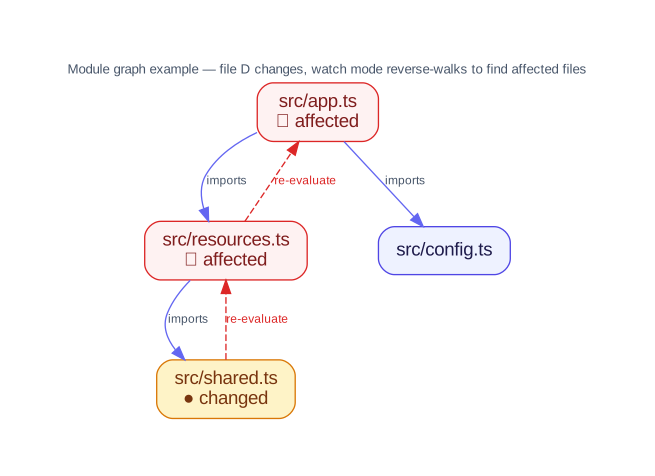
--watch mode maintains this module graph and re-evaluates only the affected files when a source file changes.

Multi-file output
Section titled “Multi-file output”When your project uses child projects (e.g. nested stacks), the build may produce multiple output files. For example, the AWS lexicon’s nestedStack() generates a parent template plus one child template per child project:
chant build -o template.json# Produces:# template.json — parent template# network.template.json — child template (one per nestedStack)All generated files are written alongside the primary output file. See Multi-Stack Output for details.
Deployment
Section titled “Deployment”chant does not include a deployment engine. Use your target platform’s tools to deploy the generated output. See your lexicon’s documentation for provider-specific deployment examples.