Config Connector Concepts
Every exported resource declaration becomes a Config Connector manifest document in the generated YAML.
Resource structure
Section titled “Resource structure”Every Config Connector resource has four standard fields:
| Field | Source | Example |
|---|---|---|
apiVersion | Resolved from resource type | storage.cnrm.cloud.google.com/v1beta1 |
kind | Resolved from resource type | StorageBucket |
metadata | From metadata property | { name: "my-bucket", labels: {...} } |
spec | From remaining props | Resource-specific configuration |
Resource references
Section titled “Resource references”Config Connector resources reference each other using resourceRef:
# By name (same namespace)resourceRef:  name: my-network
# By external reference (cross-project)resourceRef:  external: projects/my-project/global/networks/my-network
In chant, resource references resolve automatically:
export const network = new ComputeNetwork({ autoCreateSubnetworks: false });
export const subnet = new ComputeSubnetwork({  networkRef: { name: network },  // Resolves to metadata.name of network  ipCidrRange: "10.0.0.0/24",  region: "us-central1",});
Status attributes
Section titled “Status attributes”Config Connector writes a resource’s status once it is ready, so a value such as a Cloud Run service’s URL never appears in the YAML you apply. Another lexicon or an output can still reference it. Each scalar field of a CRD’s status is an attribute, with dots read as underscores:
export const web = new CloudRunService({ /* ... */ });
web.status_uri;           // status.uriweb.status_latestReadyRevision;
Nested and list fields, such as status.conditions, are not attributes.
Project binding
Section titled “Project binding”Set a member’s project once in its chant.config.ts:
export default { lexicons: ["gcp"], gcp: { project: "my-project" } };The build writes it as every resource’s cnrm.cloud.google.com/project-id annotation and resolves GCP.ProjectId from it, so apply and the live reads find the same project. It reaches the build as config data, so it also holds under --sandbox.
You can also bind resources to a GCP project via annotations:
import { defaultAnnotations, GCP } from "@intentius/chant-lexicon-gcp";
export const annotations = defaultAnnotations({  "cnrm.cloud.google.com/project-id": GCP.ProjectId,});
This injects the project annotation into every resource. Without it, Config Connector uses the namespace’s default project.
GCP.ProjectId is read from gcp.project in chant.config, else GCP_PROJECT_ID, and GCP.Region and GCP.Zone from GCP_REGION and GCP_ZONE, at build. Config Connector YAML has no parameters, so a pseudo-parameter in a resource’s spec, such as CloudRunServiceComposite’s default location and projectRef, must resolve: a build with the variable unset fails and names each resource and variable. Set the variable, or pass the value explicitly.
gcpApply and the live reads (observe, health, drift) take a resource’s project from its own spec.projectRef.external (an id or projects/<id>), then the project annotation, which is where gcp.project lands, then GCP_PROJECT_ID, then GOOGLE_CLOUD_PROJECT.
The live reads also resolve a reference to another resource the way the build does: neg.name is the target’s metadata.name, or its logical id in kebab case when it sets none.
Reconciliation lifecycle
Section titled “Reconciliation lifecycle”Config Connector resources go through a reconciliation lifecycle:
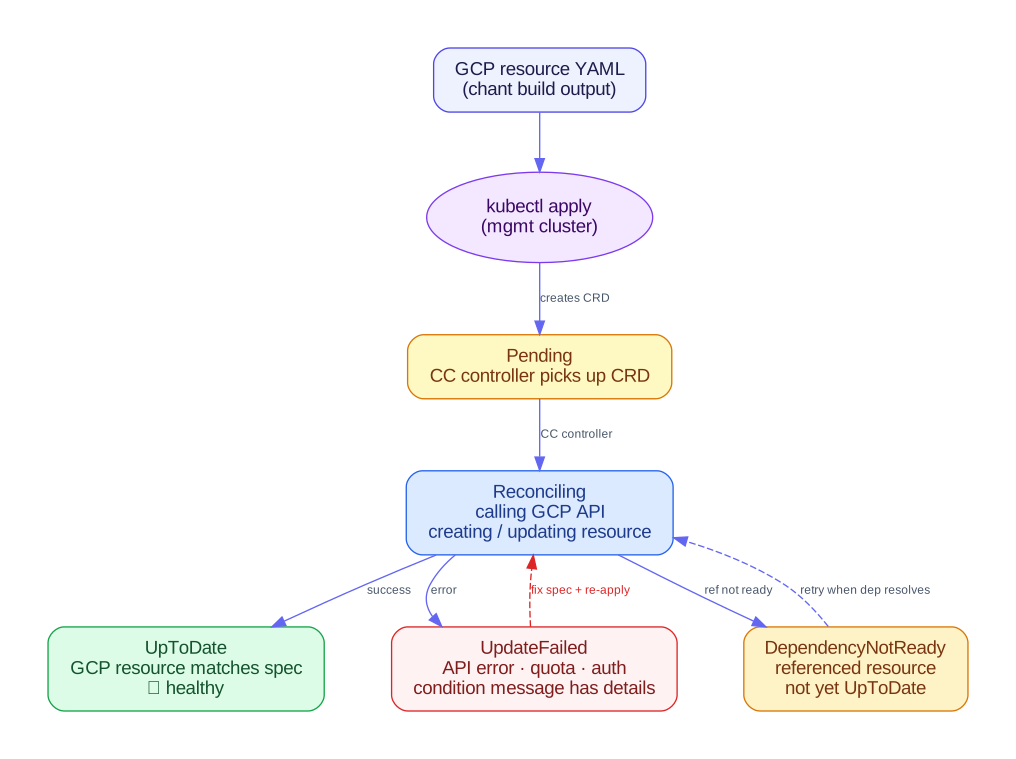
| Status | Meaning |
|---|---|
| UpToDate | Resource matches desired state |
| Updating | Controller is applying changes |
| UpdateFailed | GCP API returned an error |
| DependencyNotReady | Waiting for a referenced resource |
| DeletionFailed | Cannot delete the GCP resource |
Check status with: kubectl get gcp -A or kubectl describe <resource>
Default labels and annotations
Section titled “Default labels and annotations”Use defaultLabels() and defaultAnnotations() to inject metadata into all resources:
import { defaultLabels, defaultAnnotations } from "@intentius/chant-lexicon-gcp";
export const labels = defaultLabels({  "app.kubernetes.io/managed-by": "chant",  "env": "production",});
Explicit labels on individual resources take precedence over defaults.
Outputs
Section titled “Outputs”Config Connector YAML has no outputs section. output() is exported so a gcp attribute can be named as an output, but the build can’t write its value: a field such as status.uri exists only after the resource is applied. The build prints a warning for each such output instead of dropping it. Read the value from the live resource.