Choosing Your Deployment Model
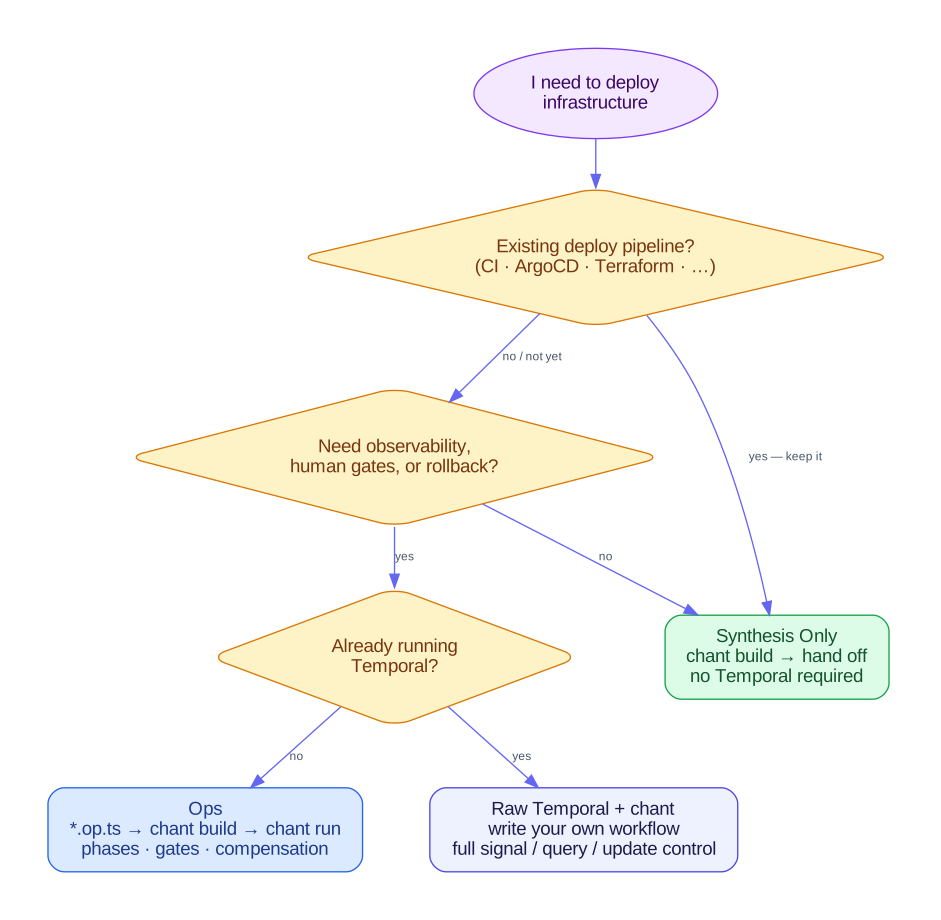
chant builds TypeScript into validated artifacts, and three layers on top of the compiler can deploy them. Pick the smallest one that fits.
Use none of the lifecycle layers and chant is a compiler whose output you deploy yourself, with no runtime or state file. Ops also start local. chant run <op> executes an Op in this process, gates and compensation included. Move an op to a steward when it needs a machine of its own, a record somebody else can read, or a schedule that fires while nobody is watching.

Hand Off to an Existing Pipeline
Section titled “Hand Off to an Existing Pipeline”chant build produces spec-native artifacts (CloudFormation, GitLab CI, Kubernetes manifests, etc.) and hands them off. You deploy them as you do today: a CI pipeline, ArgoCD, Terraform, a manual kubectl apply. You install only chant, and the lifecycle layers below go unused.
Use this when:
- You already have a deployment pipeline you trust
- You want to adopt typed, linted IaC without changing operational tooling
- Your deployments are short-running or trivially retried from scratch
How to get started: Quick Start — the entire guide covers this hand-off path.
# The complete picture when you hand off to your own toolingchant buildkubectl apply -f dist/infra.yaml # or whatever your tooling does nextOps on the local runtime
Section titled “Ops on the local runtime”Ops are named, phased deployment workflows declared in *.op.ts files. chant run <name> executes one in this process, rendering each phase and step as it runs, and appends the run’s record to the run ledger when it finishes.
import { Op, phase, shell } from "@intentius/chant/op";import { kubectlApply } from "@intentius/chant-lexicon-k8s/op/builders";
export default Op({ name: "api-deploy", phases: [ phase("Infra", [kubectlApply("dist/infra.yaml", { profile: "longInfra" })]), phase("App", [kubectlApply("dist/k8s.yaml")]), phase("Smoke", [shell("kubectl rollout status deployment/api")]), ], onFailure: [ phase("Rollback", [shell("kubectl delete -f dist/infra.yaml --ignore-not-found")]), ],});chant run api-deployYou get live phase progress on your terminal, automatic retry on step failure, onFailure phases when the run ends with an error, and gate steps that stop the run pending a resolution on the gate ledger.
Use this when:
- Deployments take more than a few minutes
- You want to see current phase and history without grepping logs
- Some steps need to stop for human approval or an external event (DNS delegation, change-window approval)
- You want automatic rollback on failure without scripting it yourself
How to get started: Quick Start for synthesis, then the Ops guide for Op authoring and chant run. Nothing to install and nothing to run.
Components — Release Model
Section titled “Components — Release Model”When you have many releasable units — services, tables, clusters, libraries — and don’t want a hand-maintained pipeline per unit, declare each as a *.component.ts component. A component says what it builds, what it produces, and how it deploys, composed from a bounded capability set. chant build generates one generic orchestrator Op that runs them in dependency order; chant run --components <name> runs one. Adding a component adds a declaration, not a pipeline. Supply-chain attestations — SBOM, SLSA provenance, keyless signing — attach to the artifact, and a verify step gates apply.
Use this when:
- You deploy many units off-cluster and each currently drags its own pipeline
- You want build-once / publish-by-digest with SBOM, signing, and a verify gate
- You want rollback via per-capability compensation instead of hand-written scripts
How to get started: Components Overview, then Component Contract. Runs on the local runtime by default, and moves to a hosted one with the same --on flag an Op uses. For where this sits against Ops and the lifecycle dial, see Components.
Ops on a fountain steward
Section titled “Ops on a fountain steward”The same *.op.ts files, hosted. A Steward declares one environment’s machine: an agent running chant acp, whose runs all go to one long-lived conversation that keeps its sandbox’s disk across park and wake. An op’s cadence stays on the op, for a clock outside Managoat (a CI schedule, a CronJob) to fire.
export const { agent } = Steward({ name: "prod-steward", environment: toolchain, vault: prodCreds, ops: [prodWatch, prodConverge, prodApply],});chant run prod-apply --on fountainThe command line chant run prod-apply goes into the steward’s conversation as a prompt, the CLI tails its event stream, and the run’s record comes back in the shape a local run would have written. The conversation is that environment’s operational history: each turn is one command somebody could have typed.
Use this when:
- The op has to run when nobody is at a keyboard, on a cadence
- You want one writer per environment rather than whoever ran it last
- You want the record of what was done to an environment to outlive the terminal it was done from
- The op needs credentials that should never reach a laptop
How to get started: The Steward, then Running an Op on fountain and the fountain-steward example.
Decision Table
Section titled “Decision Table”| Situation | Model |
|---|---|
| I have ArgoCD / Terraform / an existing deploy pipeline | Hand off (existing pipeline) |
| My deployment script is more than 50 lines and fails unpredictably | Ops |
| I need a human approval gate mid-deploy | Ops (the gate is a fact either way) |
| I have many deployable units each dragging its own pipeline | Components |
| I want build-once, SBOM + signing, and a verify gate before apply | Components |
| I need parallel regional deploys with independent retry | Ops |
| This has to run on a cadence with nobody watching | Ops on a steward |
| I want one writer per environment, and a conversation that says what it did | Ops on a steward |
| I need to query a running deploy’s state | chant run status, or the MCP op-status tool |