
terragucci

TERRAGUCCI
Sophisticated automation for Terraform
Works
- init finds every root and writes the pipeline for your forge
- Each root runs its own pinned Terraform or OpenTofu version
- Roots that read each other through terraform_remote_state apply in waves, in order
Proven by recorded checks: 224 for plain roots, 274 on OpenTofu and 13 on GitHub. Each count covers one choice. Validation
First step
Get your first plan noteThen read terragucci for Terraform or OpenTofu roots: what you can count on, and the proof.
Good to know
- No server to host
- GitHub, GitLab or Forgejo
- Object storage on AWS, GCP or Azure
- Tracing and metrics
- Rich lifecycles
- Gated waves
- Aggregated plan output
- Module publishing and pinned rollouts
With the 0.4.7 release, every approval is one command, terragucci approve. 0.4.5 added SQL over the reports bucket, resuming a killed choudoufu wave from its records, and imports from HCP Terraform, Scalr, Spacelift and env zero. Watch the launch party from the Rome launch.
Your forge and your bucket
Section titled “Your forge and your bucket”terragucci reads your roots and runs your binary. Code, state backend and provider pins stay as you have them.
| Where it runs | What you set | Page |
|---|---|---|
| GitHub, GitLab or Forgejo CI | nothing: init reads the forge from the origin remote and writes its pipeline format |
Per forge |
| S3, GCS or Azure Blob, for your state and the reports | oidc for keyless cloud identities, reports.bucket for the reports |
Credentials, Keep reports in a bucket |
See every run as a trace
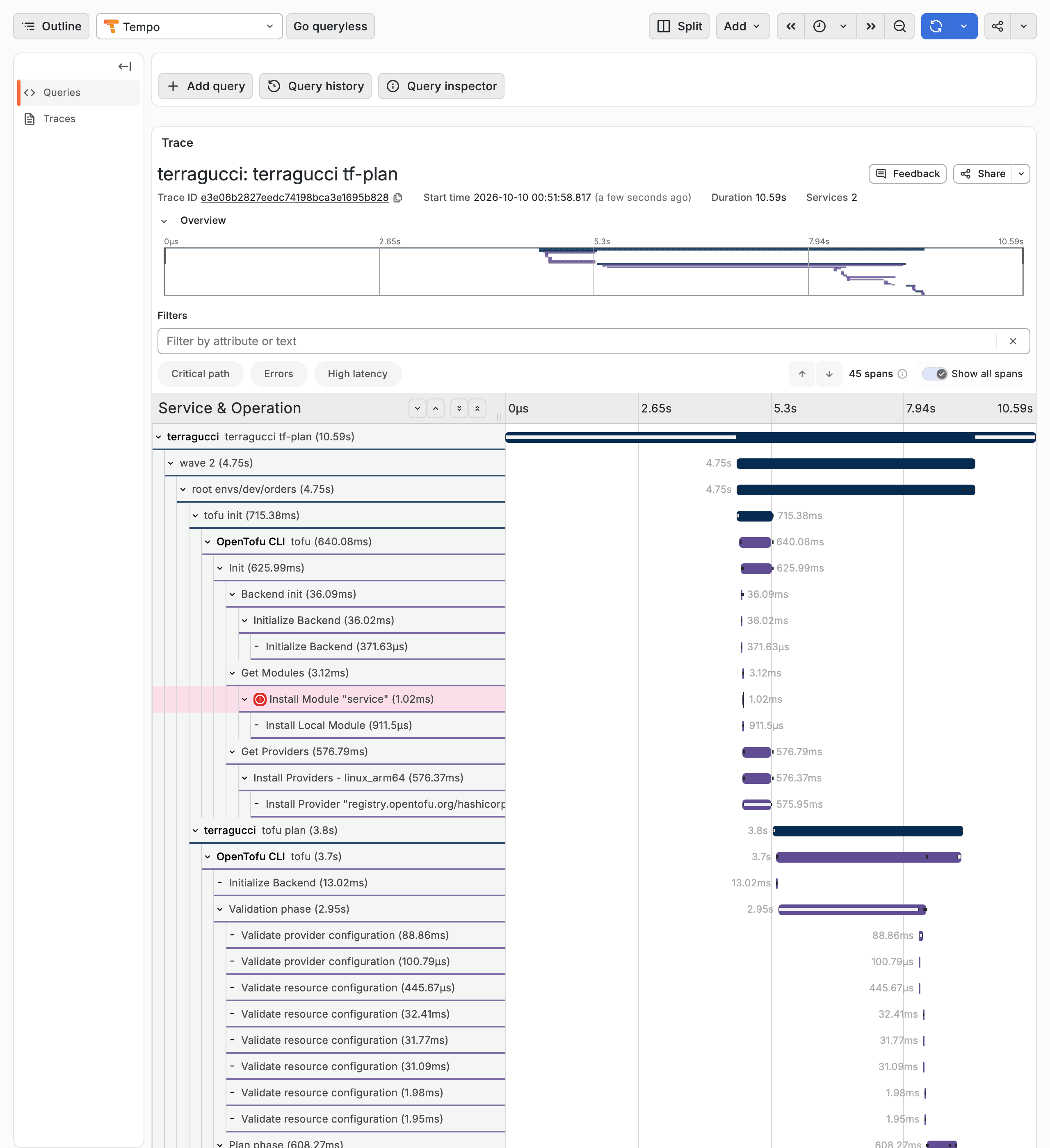
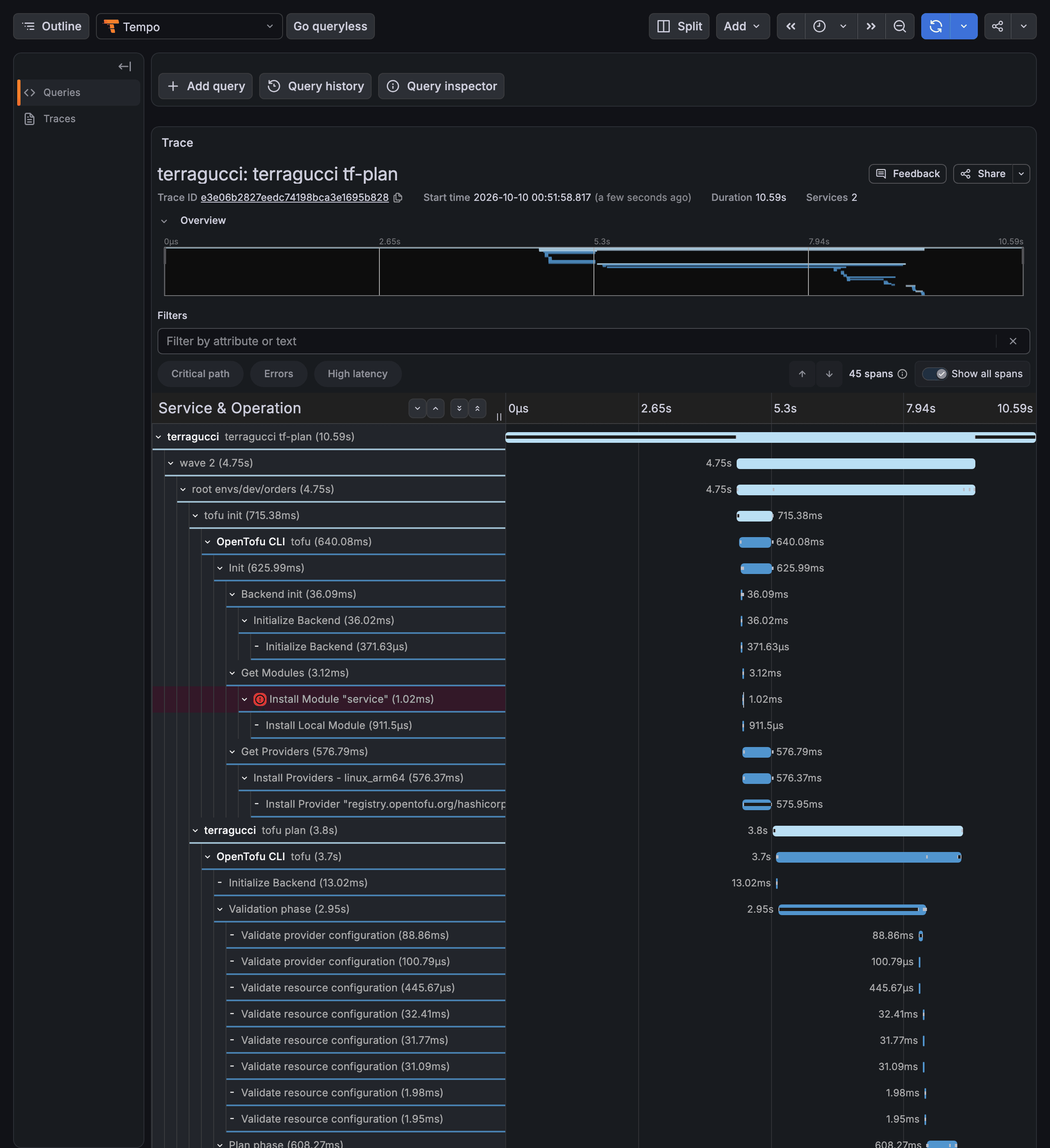
Section titled “See every run as a trace”Every plan, apply and drift run sends one OpenTelemetry trace and the pipeline’s metrics over OTLP to your collector.
| The trace shows | Page |
|---|---|
| The stage, then a span per wave and per root, with digests, change counts and status | Send traces and metrics |
| The binary’s own spans inside each root: OpenTofu’s resources, and with choudoufu its provider calls and state lock waits | Traces and metrics |
Metrics and the Grafana dashboards init writes with dashboards: true |
The metrics |
The lifecycle around your roots
Section titled “The lifecycle around your roots”init writes the pipeline for these stages in your forge’s own format. Architecture.
tf-checkevery pushFormat and validate, before anything plans.
tf-planevery pull requestOnly the roots the change touches, summarised in one note.
tf-applyon merge, or before itWave by wave; by default a wave that destroys or replaces waits for its approval.
tf-drifton a scheduleEvery root planned against live state, drift reported grouped.
tf-publishon merge, with modules setEach changed module published under its next version, as an OCI artifact or a git tag.
tf-rollouteach time you run itOne pull request per wave, moving the pins to the new version.
Waves and approvals
Section titled “Waves and approvals”A change goes out a few roots at a time, starting with the canary roots. By default a wave that destroys or replaces something waits for an approval, which covers exactly the plans it was shown.
- wave 13 roots
set:4f1a…c09e appliedthe canary roots, approved by alex
 - wave 297 roots
set:b77d…12a4waitingnpx terragucci approve wave-2 - wave 3100 roots
planned when wave 2 appliesnextplanned once wave 2 has applied
refusedA plan in wave 2 changed after the approval, so wave 2 applied nothing and named both digests.
The report lists each wave with the digest of its plans and links the approval record that let it go out. Waves and approvals.
One note for two hundred plans
Section titled “One note for two hundred plans”terragucci200 roots planned. 3 groups, 1 destroy.
| 180 | identical change ~ aws_iam_role.app tags |
| 15 | the same, plus -/+ aws_lambda_function.worker |
| 5 | different changes, listed one by one below |
  # aws_iam_role.app will be updated in-place
~   resource "aws_iam_role" "app" {
~       tags = {
-           "team" = "payments"
+           "team" = "platform"
        }
        # (12 unchanged attributes hidden)
    }
prod-eu/db: Plan: 0 to add, 1 to change, 1 to destroy.
The root's whole plan, as the binary printed it.
destroyprod-eu/db · aws_db_instance.main
| Wave | Roots | Approval |
|---|---|---|
| 1 | 3 | not-requested |
| 2 | 97 | not-requested |
| 3 | 100 | not-requested |
Roots taking the same change share one diff that shows each value before and after. Every destroy is named. Each root’s whole plan sits collapsed below, and the full report links each root’s plan.
The largest run of the scale bench planned and applied 10,069 resources in 1,361 roots across 12 repos, governed by one control repo: the control repo's pipeline pull requests opened, every root created, then a change to all of them planned and applied, in 120 minutes on a build of terragucci just after 0.4.1.
Module publishing and pinned rollouts
Section titled “Module publishing and pinned rollouts”| You get | Turn it on | Page |
|---|---|---|
| Each changed module released after the apply, as a git tag or an OCI artifact, and with attest signed with cosign | modules.publish, modules.attest |
Publish your modules |
| A new version rolled out to every repo that pins the module, one pull request per wave | terragucci rollout, or rollouts: for a scheduled job |
Roll out a new module version |
With choudoufu
Section titled “With choudoufu”choudoufu is the OpenTofu fork from the team behind terragucci. Set binary: choudoufu (set it up) and the pipeline also gets:
| You get | Page |
|---|---|
A live check in tf-check on every push, before the apply waves, with no cloud credentials |
Check |
| One record per resource in an S3 backend you own, each write conditional, with no lock table or database to run; the state file is a cache | Record writes |
| How long a wave waited for a state lock, and how many tries it took | State lock waits |
| Which provider calls were slow, and the resource each was for | What the report lists |
| Timings summed by resource type, so a large estate’s report stays readable | What the report lists |
| Changes to different resources of one estate apply at the same time; an overlapping change waits, or is refused, before it reaches the cloud; a killed apply leaves nothing to release | Locking with choudoufu |
A role scoped to one estate by an IAM condition on the tofu-estate tag, refused on another estate’s resources |
Live resource markers |
Pull request automation
Section titled “Pull request automation”These are plain CI jobs in your pipeline.
| On a pull request | How you start it | Forges | Page |
|---|---|---|---|
One grouped plan note and a terragucci/plan status |
open or push to the pull request | all three | Get your first plan note |
| Tips and policy results on the plan | on by default with the plan; tips: false turns tips off, policy adds checks |
all three | Tips, Policy |
| A re-plan | comment /terragucci plan [root] |
all three; GitLab through the comments schedule | Re-plan from a comment |
| Root locks by comment | comment /terragucci lock or /terragucci unlock |
GitHub and Forgejo; GitLab with apply.when: pull-request and comments: set |
Locks |
| Root locks from the first plan | locks: plan |
GitHub and Forgejo | Locks |
| Apply before merge, then merge after the last wave | apply.when: pull-request, then comment /terragucci apply [wave-<n>] |
GitHub, Forgejo, and GitLab with comments: set |
Apply before merge |
| An approval for a waiting wave | approval: ledger, pr-review or sealed; run terragucci approve |
all three | Approve a waiting wave |
| A recorded policy override | a listed person runs terragucci override |
all three | Override a policy denial |
| Comment commands on GitLab | comments: sets the schedule that answers merge request notes |
GitLab | Re-plan from a comment |
Opt-in: coding agent
Section titled “Opt-in: coding agent”Only these four features run a model. Each is off until you set it up and needs a model API key in your forge’s secrets.
| Feature | Turn it on | Forges | Page |
|---|---|---|---|
Comment /terragucci agent <ask> and an agent commits the change to the pull request |
agent.comment in terragucci.yml |
GitHub and Forgejo | Have an agent change a pull request |
| When drift opens the drift issue, an agent changes the code to match what is live, in a pull request | agent.drift in terragucci.yml |
GitHub and Forgejo | Have an agent fix drift |
| A note on each pull request comparing its description with its plan: risk, mismatches, questions | review.agent in terragucci.yml |
all three; GitLab through the comments schedule | Have a model review a pull request |
| A summary of what moved in a refused wave | add the explain-refusal job under own_jobs |
all three | Have an agent summarize a refused wave |
A coding agent at your desk reads the estate (down to a root’s last apply), the audit trail and the DORA figures through terragucci mcp, a read-only MCP server that runs no model (Read the estate over MCP).
Security
Section titled “Security”| Guard | What it means |
|---|---|
| Plan and apply use separate roles | oidc takes one identity for plan and one for apply, and terragucci rejects the same role for both |
| The plan job cannot apply | it runs the pull request’s code with the read-only plan role and never gets the apply role; under approval: sealed an approval also needs a signer’s key, which no job holds |
| A changed plan is refused | a gated wave whose plans moved after the approval applies nothing and names both digests |
The threat model lists what each job can reach on each forge.
Limits
Section titled “Limits”What terragucci leaves to your forge and your cloud, and what it does not support.
| Not here | Why, and what you use instead |
|---|---|
| Bitbucket and Azure DevOps | init writes pipelines for GitHub, GitLab and Forgejo only. (more) |
| Accounts, sign-in and roles of its own | Your forge decides who signs in and approves, and your cloud IAM decides what each job reaches. (more) |
| A hosted web UI | Runs show on your forge's run pages and on the estate page in your bucket. (more) |
| A server or database to run | Every job runs in your CI and writes to your git and your bucket. (more) |
Recorded checks show what is proven on each tool and forge (validation). Apache-2.0.
Hand the setup to your agent
Section titled “Hand the setup to your agent”Add terragucci to a repo has the same steps by hand. Or paste this into Claude Code, Codex or Cursor in your repository. The agent page says what the agent does. It never applies and never approves.
Hand the setup to your coding agentOr set up by hand: install terragucci and run init, as the getting started page shows.Show the whole prompt
Set up terragucci in this repository.
Read https://intentius.io/terragucci/llms.txt first, then
https://intentius.io/terragucci/getting-started/agents/ and follow it.
Open a pull request with the result.
Never apply, approve (a pull request review or `terragucci approve`), override a policy denial (`terragucci override`), use `--mode apply`, or merge; never touch `.chant/allowed_signers` or `chant/lifecycle`.Then the guides cover tasks and the reference the details; the concepts and the glossary explain the reasons and the terms. terragucci is built on chant, and SQL Yodeler brings ClickHouse and Postgres schemas through the same approvals.
These docs count page views and clicks with PostHog. They set no cookies, store nothing in your browser, and send nothing when your browser asks not to be tracked.