
Fix a refused wave
 Optional: hand this page to your coding agentThe steps work by hand too.
Show the whole prompt
Read https://intentius.io/terragucci/guides/fix-a-refused-wave/.
Fetch both reports, run `npx terragucci respond wave-refused ... --json`,
and tell me in five lines which roots moved and why. The decision is mine.
Never apply, approve (a pull request review or `terragucci approve`), override a policy denial (`terragucci override`), use `--mode apply`, or merge; never touch `.chant/allowed_signers` or `chant/lifecycle`.Result
Section titled “Result”A decision on a refused wave: the new plan approved and applied, or the change that moved it removed.
Prerequisites
Section titled “Prerequisites”| You need | Why |
|---|---|
| A wave that stopped with a refusal | the job says the set digest no longer matches its approval, and nothing in the wave applied |
| The apply job’s log | unless respond.wave-refused is off, it prints the diff from step 3 |
The job’s artifact, terragucci-report-apply-wave-<k> |
it holds both reports the diff compares |
-
Understand why it refused.
An approval binds a wave’s set digest. The wave applies nothing if any root’s plan changes between the approval and the apply. The usual cause is another merge touching a root in the wave, or a data source reading a new value. An approval the wave already applied under refuses nothing: the next plans wait.
In the tutorial’s example, approve the waiting wave and then merge the module bump. Its job stops and names the roots that moved:
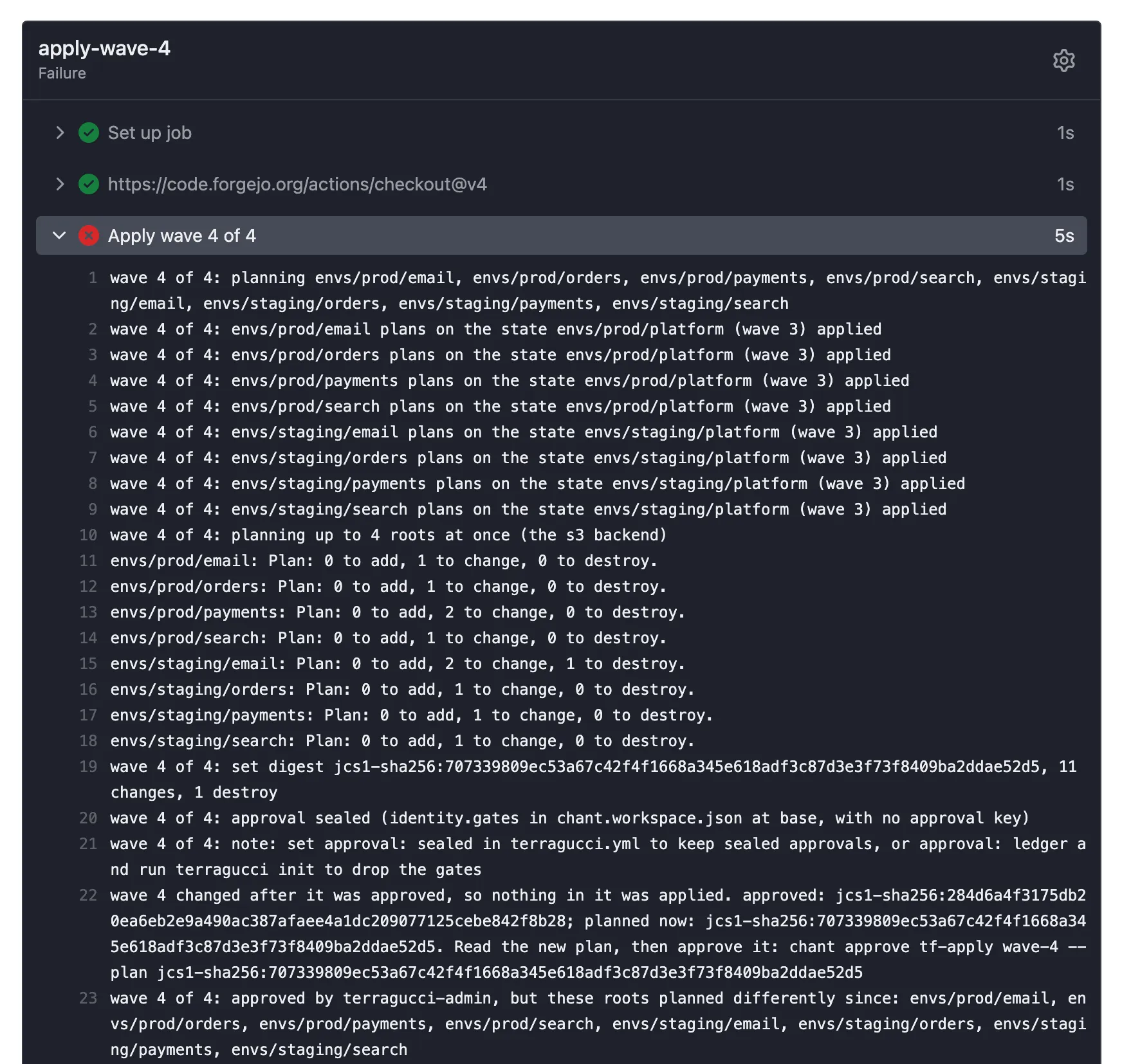
$ just example merge module-bump [example] merged change/module-bump into main Merged pull request 5 into main Pipeline http://localhost:3300/terragucci-admin/example/actions/runs/14/jobs/0/attempt/1 (failure) wave 4 changed after it was approved, so nothing in it was applied. approved: jcs1-sha256:284d6a4f3175db20ea6eb2e9a490ac387afaee4a1dc209077125cebe842f8b28; planned now: jcs1-sha256:707339809ec53a67c42f4f1668a345e618adf3c87d3e3f73f8409ba2ddae52d5. Read the new plan, then approve it: terragucci approve wave-4 --plan jcs1-sha256:707339809ec53a67c42f4f1668a345e618adf3c87d3e3f73f8409ba2ddae52d5 --sign wave 4 of 4: approved by terragucci-admin, but these roots planned differently since: envs/prod/email, envs/prod/orders, envs/prod/payments, envs/prod/search, envs/staging/email, envs/staging/orders, envs/staging/payments, envs/staging/search -
Get the two reports.
The artifact
terragucci-report-apply-wave-<k>holds the refused job’sterragucci-report/, with the approved report inapproved/report.jsonand the job’s own incurrent/report.json. Fetch it to a localterragucci-report/directory.Terminal window gh run download <run-id> -n terragucci-report-apply-wave-2 -D terragucci-reportThe
apply-wave-2job’s page > Job artifacts > Download, then unzip it in the checkout; the archive holdsterragucci-report/.The run’s page > Artifacts >
terragucci-report-apply-wave-2, then unzip it intoterragucci-report/.The approved report also stays on
chant/lifecycleat_gates/tf-apply/wave-<k>/<digest>.json(:written as_):Terminal window git fetch origin chant/lifecyclegit show origin/chant/lifecycle:_gates/tf-apply/wave-2/jcs1-sha256_<hex>.json -
Print the diff.
Terminal window npx terragucci respond wave-refused --approved terragucci-report/approved --current terragucci-report/current --wave 2It lists each root whose plan digest moved and what changed inside it.
--jsonprints one envelope. -
Decide.
Choice Command Result Keep the new plan npx terragucci approve wave-2 --plan <digest>from a checkout, with the new digest the job printed. It approves it, signs underapproval: sealed, and restarts the wave (Approve a waiting wave)The new plans apply. Drop it Revert the change on the default branch. The old approval does not come back: the refused run recorded a newer pending fact, so the wave waits for a fresh approval.
An agent may summarize the diff, but it does not re-approve.

These docs count page views and clicks with PostHog. They set no cookies, store nothing in your browser, and send nothing when your browser asks not to be tracked.