
A wave that changed
 Optional: hand this page to your coding agentThe steps work by hand too.
Show the whole prompt
Read https://intentius.io/terragucci/tutorial/changed-wave/.
In the terragucci clone with the example booted, run `just example change destroy` and `just example change module-bump` and summarize both plan notes. Then stop and print the page's merge and approve commands for me. Do not run them.
Never apply, approve (a pull request review or `terragucci approve`), override a policy denial (`terragucci override`), use `--mode apply`, or merge; never touch `.chant/allowed_signers` or `chant/lifecycle`.An approval covers the plans you read and no others.
-
Open the destroy change and merge it, so wave 4 waits:
Terminal window just example change destroyjust example merge destroy -
Approve wave 4, as on the previous page:
Terminal window just example approve -
Before you run the wave’s job again, change the shared module, so every root in wave 4 plans again:
Terminal window just example change module-bumpjust example merge module-bump
$ just example approve

  Approved  wave-4, signed as terragucci-admin
$ just example change module-bump
[example] pushed change/module-bump at c2b8832e
[example] run 12 for c2b8832e (pull_request): success (http://localhost:3300/terragucci-admin/example/actions/runs/12/jobs/1/attempt/1)
[example] run 13 for c2b8832e (push): success (http://localhost:3300/terragucci-admin/example/actions/runs/13/jobs/0/attempt/1)
Pull request http://localhost:3300/terragucci-admin/example/pulls/5 (the plan note is in its conversation)
Plan http://localhost:3300/terragucci-admin/example/actions/runs/12/jobs/1/attempt/1 (success)
Check http://localhost:3300/terragucci-admin/example/actions/runs/13/jobs/0/attempt/1 (success)$ just example merge module-bump
[example] merged change/module-bump into main
Merged pull request 5 into main
Pipeline http://localhost:3300/terragucci-admin/example/actions/runs/14/jobs/0/attempt/1 (failure)
wave 4 changed after it was approved, so nothing in it was applied. approved: jcs1-sha256:284d6a4f3175db20ea6eb2e9a490ac387afaee4a1dc209077125cebe842f8b28; planned now: jcs1-sha256:707339809ec53a67c42f4f1668a345e618adf3c87d3e3f73f8409ba2ddae52d5. Read the new plan, then approve it: terragucci approve wave-4 --plan jcs1-sha256:707339809ec53a67c42f4f1668a345e618adf3c87d3e3f73f8409ba2ddae52d5 --sign
wave 4 of 4: approved by terragucci-admin, but these roots planned differently since: envs/prod/email, envs/prod/orders, envs/prod/payments, envs/prod/search, envs/staging/email, envs/staging/orders, envs/staging/payments, envs/staging/searchThe wave’s plans now differ from the approved ones, so it applies nothing:
| You see | Where |
|---|---|
| the job fails with exit code 4 | the wave’s job |
| the approved digest beside the new one, and each root whose plan moved | the job’s log |
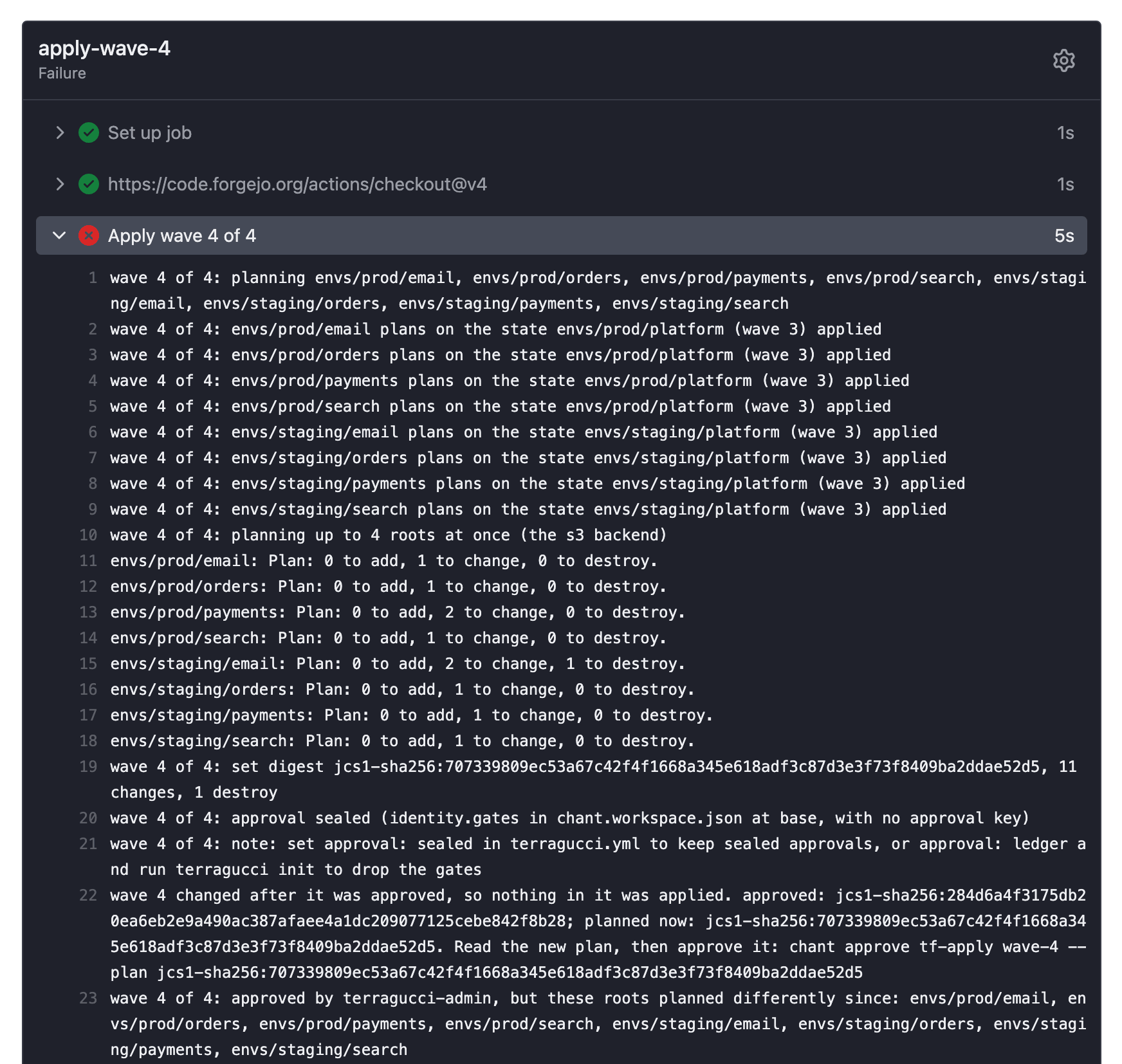
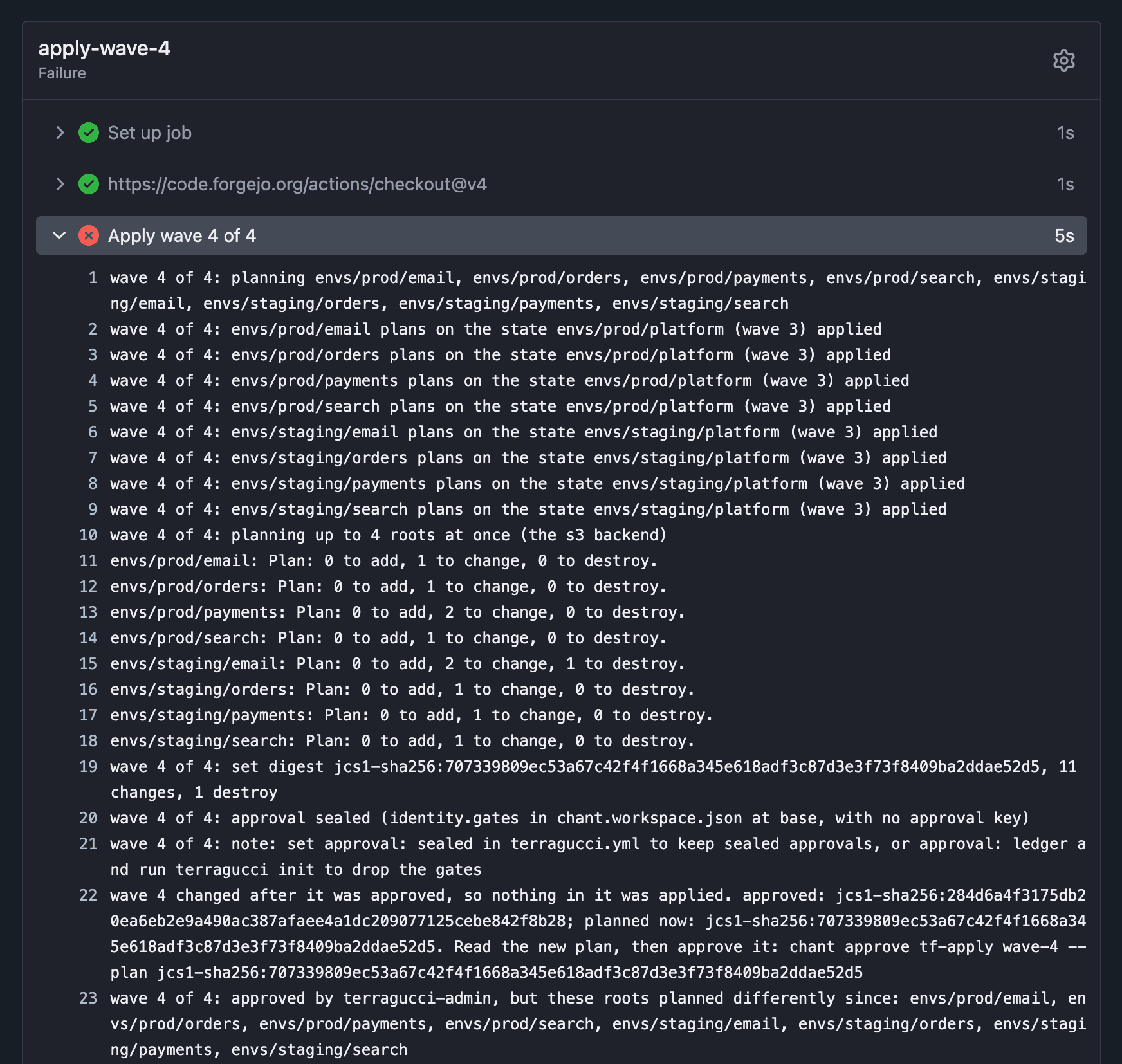
npx terragucci respond wave-refused --approved <approved report> --current <current report> --wave 4 prints what changed; Fix a refused wave describes the reports.
| If the new plan is | Do |
|---|---|
| what you meant | approve the new digest and run the job again |
| not what you meant | revert the change |
Had the job run between steps 2 and 3, wave 4 would have applied the destroy under your approval. The module bump’s wave 4 would then wait for its own approval instead of refusing.
Tutorial step 5 of 11.

These docs count page views and clicks with PostHog. They set no cookies, store nothing in your browser, and send nothing when your browser asks not to be tracked.